
Learn what's changed, what stays the same, and how to update your integration
Fourthline API v2 introduces a configurable workflow model that replaces legacy product-specific integrations.
Overview
This guide explains how to migrate an existing API v1 integration to API v2.
API v2 preserves the overall integration flow used in API v1. Authentication, asynchronous processing, and the request lifecycle remain unchanged. Most migrations only require updating endpoint URLs, request parameters, and webhook handling.
Am I using API v1?
You're using API v1 if your integration calls endpoints under the
/v1/path, or uses product-specific endpoints such as/v1/verificationsor/v1/signatures.If you're unsure, review your integration's endpoint URLs or contact your customer success manager.
Before you begin
Before migrating, make sure you:
- Have an existing API v1 integration.
- Have access to the API v2 documentation.
- Can test your integration in the sandbox environment.
- Identify the API v1 endpoints your integration uses.
- Inventory your existing webhook callback URLs.
What's changed
| API v1 | API v2 |
|---|---|
| Product-specific orchestration | Workflow-based orchestration |
| Independent product lifecycles | Unified workflow lifecycle |
| Product-specific status endpoints | Unified workflow status |
| Report formats: ZIP, PDF | Report formats: JSON, ZIP, PDF, XML |
| Product-specific webhooks | Unified workflow webhook |
What stays the same
Authentication, asynchronous request processing, standard HTTP methods, and HTTPS-only communication are unchanged in API v2.
Workflow
The following diagram shows the API v2 request flow.
API v2 preserves the overall integration flow used in API v1. Most migrations only require updating endpoint URLs, request payloads, and response schemas.
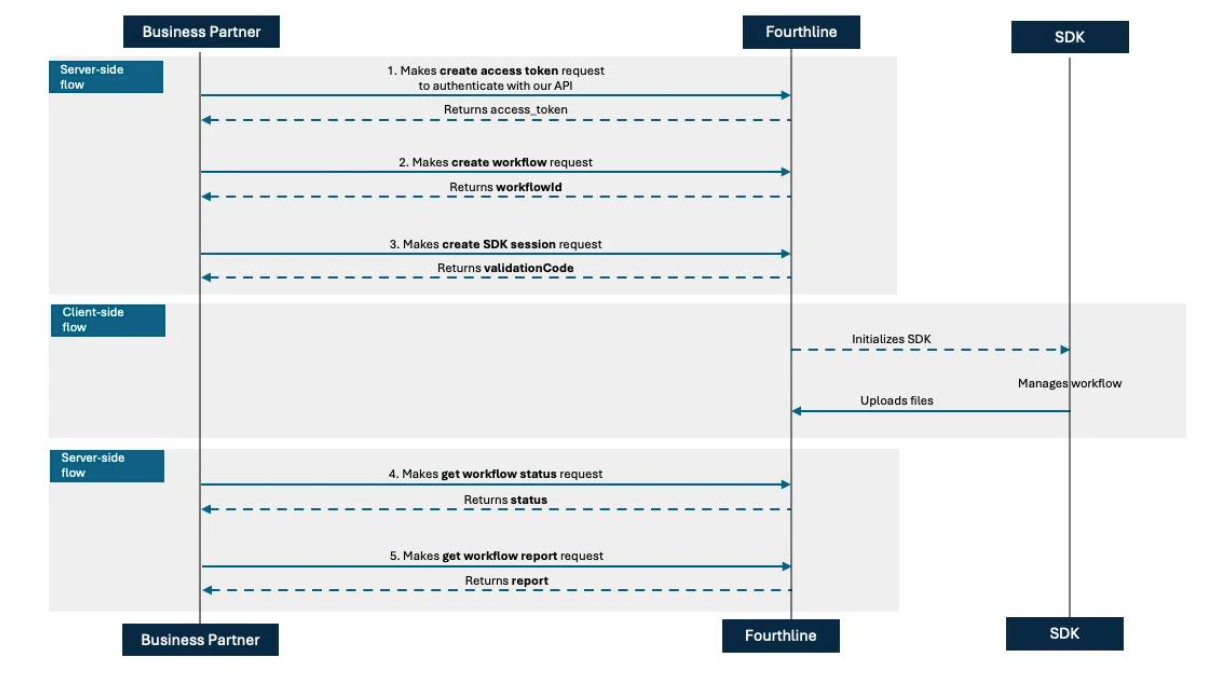
API v2 request flow
Migration checklist
Complete the following tasks to migrate your integration:
- Update endpoint URLs.
- Update request parameters.
- Update response handling where applicable.
- Update webhook configuration.
- Review asynchronous workflow handling.
- Review error handling.
- Validate your integration in the sandbox.
- Deploy to production.
Authentication
Authentication is unchanged in API v2. Continue using the client credentials grant and the existing /v1/oauth2/token endpoint. No integration changes are required.
{
      "grant_type": "client_credentials",
      "client_id": "string",
      "client_secret": "string"
}
Create a workflow
Create a workflow for a new or existing client.
| Item | API v1 | API v2 | Action |
|---|---|---|---|
| Endpoint | /v1/workflows | /v2/workflows | Update the endpoint URL. |
| Request field | workflowName | workflow | Rename the field. |
| Request field | providerClientId | partnerClientId | Rename the field and reuse the identifier for the same natural person. |
| Response | Returns workflowId and clientId | Unchanged | No changes required. |
| Success response | 200 OK | 201 Created | Update your success handling. |
{
  "workflowName": "IDVandQES",
  "providerClientId": "abcd-client-12345"",
}
Note
Use the same
partnerClientIdfor the same natural person across workflows to prevent duplicate client records.
Create an SDK session
Generate a validation code for the Mobile SDK or Web SDK.
| Item | API v1 | API v2 | Action |
|---|---|---|---|
| Endpoint | /v1/workflows/{workflowId}/validationcode | /v2/workflows/{workflowId}/validationcode | Update the endpoint URL. |
| Request and response | Unchanged | Unchanged | No changes required. |
{"target":"Mobile"}'

or

{"target":"Web"}'
Upload client data (optional)
Upload or update identity data for a client.
| Item | API v1 | API v2 | Action |
|---|---|---|---|
| Endpoint | /v1/verifications/{verificationId}/kycdata | /v2/workflows/{workflowId}/clients/{clientId} | Update the endpoint URL. |
| Client reuse | Not supported | Supported | Reuse clientId. |
| Reference data | Not supported | referenceDocumentData | Upload reference data. |
| Request and response | See Upload identity data | See Upload or update client data | Review the API v2 schema. |
{
  "person": {
    "type": "string",
    "name": "string",
    "initials": "string",
    "firstName": "string",
    "middleName": "string",
    "lastName": "string",
    "otherLastName": "string",
    "nationality": "string",
    "gender": "string",
    "birthDate": "string",
    "placeOfBirth": "string"
  },
  "address": {
    "street": "string",
    "streetNumberPrefix": "string",
    "streetNumber": 0,
    "streetNumberSuffix": "string",
    "postalCode": "string",
    "region": "string",
    "city": "string",
    "country": "string"
  },
  "emailAndPhone": {
    "email": "string",
    "phone": "string",
    "mobile": "string"
  },
  "tax": {
    "countrySubjectToTaxation": "string",
    "tin": "string",
    "usPerson": "string",
    "usTin": "string"
  },
  "riskRequirements": [],
  "deviceMetaData": {
    "browserType": "string",
    "browserVersion": "string",
    "ipAddress": "string",
    "language": "string",
    "latitude": "string",
    "longitude": "string",
    "model": "string",
    "osCompromised": "string",
    "osVersion": "string",
    "region": "string",
    "sdkVersion": "string",
    "analyticsId": "string"
  }
}
'
Upload files (optional)
Upload identity documents and other files for a client.
| Item | API v1 | API v2 | Action |
|---|---|---|---|
| Endpoint | Product-specific endpoints | /v2/workflows/{workflowId}/clients/{clientId} | Use the unified upload endpoint. |
| Document types | Product-specific | Unified | Update the document type where required. |
| Request and response | See Upload identity files | See Upload client document | Review the API v2 schema. |
Start a workflow (optional)
You don't need to call this endpoint when using the Mobile SDK or Web SDK.
| Item | API v1 | API v2 | Action |
|---|---|---|---|
| Endpoint | Multiple product-specific endpoints | /v2/workflows/{workflowId}/start | Update the endpoint URL. |
| Request and response | See API Reference | See Start workflow | Review the API v2 schema. |
Check workflow status
Retrieve the current workflow and product statuses.
| Item | API v1 | API v2 | Action | |
|---|---|---|---|---|
| Endpoint | Multiple product-specific endpoints | /v2/workflows/{workflowId}/status | Update the endpoint URL. | |
| Status model | Product status | Workflow and product statuses | Handle workflowStatus and products[].status. | |
| Request and response | See API Reference | See Get workflow status | Review the API v2 schema. |
{
  "verificationId": "790f325a-48c9-4b82-bb53-c0ea128236f0",
  "verificationStatus": "new",
  "dataValidationError": {}
}
Retrieve reports
Retrieve the reports generated for a completed workflow.
| Item | API v1 | API v2 | Action |
|---|---|---|---|
| Report formats | ZIP, PDF | JSON, PDF, ZIP, XML | Use the endpoint for the required format. |
| Request and response | See API Reference | See Reports | RUse the endpoint for the required format. |
Update webhooks
Update your webhook integration to receive workflow-based notifications.
| Item | API v1 | API v2 | Action |
|---|---|---|---|
| Callback URLs | Product-specific | Single workflow webhook | Update your integration to use one webhook endpoint. |
| Notifications | Product-specific | Workflow-based | Update your webhook handler to process workflow events. |
Validate your migration
Before deploying to production, verify that your integration can:
- Confirm production credentials and endpoints are configured.
- Authenticate successfully.
- Create a workflow.
- Generate an SDK validation code.
- Upload client data and documents.
- Start workflows where required.
- Receive webhook notifications.
- Retrieve workflow status.
- Retrieve reports in the required format.
- Handle retries and error responses correctly.
Support
For any questions, contact your Fourthline delivery manager.