
Biometrics Component
App Components
Use the Biometrics Component to capture the client's selfie photo and video according to your workflow tenant configuration, including settings such as liveness.
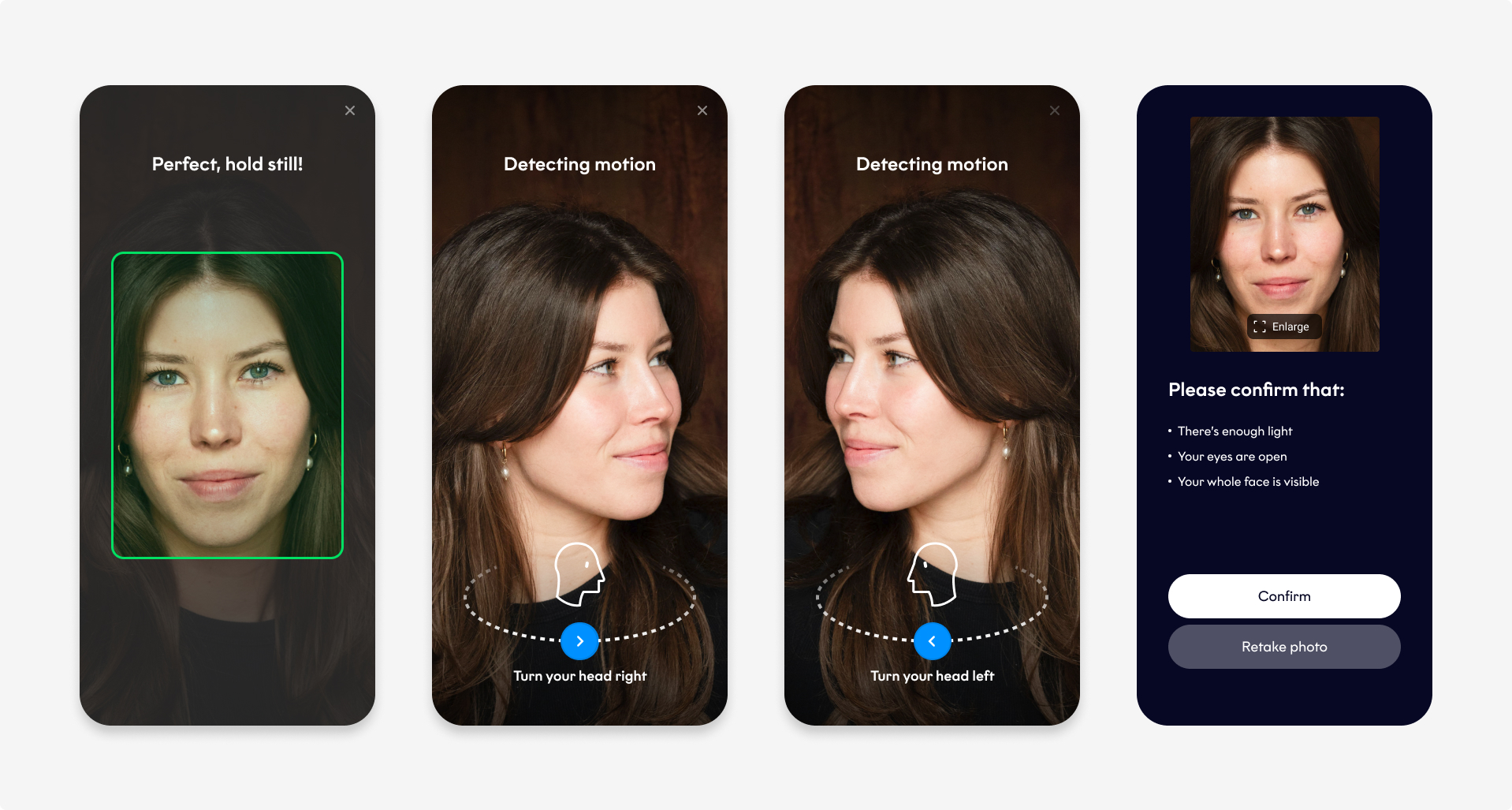
Biometrics Component
Before you begin
- Start a workflow session (
Orca.workflowSession), then callbiometricsComponent. - Before showing the SDK UI, the component performs preparation. If preparation fails,
onProductCompletedis called with a failure, and onPresentationStartedis not called.
Success handling
If the workflow completes successfully, the component returns:
- A
selfieobject containing the selfie photo, timestamp, and location, if available. - A
livenessobject containing the selfie video, if configured.
data class BiometricsComponentResult(
    val selfie: WorkflowResults.IDV.Selfie,
    val liveness: WorkflowResults.IDV.SelfieVideo?,
)
{
"selfie":{
"image":"String",
"timestamp":"String",
"location":{
"latitude":"String",
"longitude":"Number"
}
},
"liveness":{
"url":"String",
"duration":"String",
"location":{
"latitude":"String",
"longitude":"Number"
}
}
}Plugins selfie attributes
All attributes are optional.
| Attribute | Description |
|---|---|
image String | The absolute url filepath to the selfie photo. |
location Object | The coordinates of the selfie photo. |
location.latitude String | The latitude of the selfie photo. Format: Float between -90 and 90 Example: 45.464664 |
location.longitude String | The longitude of the selfie photo. Format: Float between -90 and 90 Example: 45.464664 |
Plugins liveness attributes
All attributes are optional.
| Attribute | Description |
|---|---|
url String | The absolute url filepath to the selfie video. |
duration String | The length of the selfie video. [What unit of time? Seconds?] |
location Object | The coordinates of the selfie video. |
location.latitude String | The latitude of the selfie video. Format: Float between -90 and 90 Example: 45.464664 |
location.longitude String | The longitude of the selfie video. Format: Float between -90 and 90 Example: 45.464664 |
Presentation callbacks
Use the same present(onPresentationStarted:onProductCompleted:) callbacks described for the Document Component. See the Document Component tab for the callback table and loading indicator guidance.
Error handling
The Biometrics Component returns WorkflowFailure when biometric capture or validation fails.
The component shares failure codes with the Document Component, including idv.*, session.*, transport.*, and user.canceled.
Recovery actions
Use recovery to determine the next action and code to handle specific outcomes, such as user.canceled or identity verification failures.
For available recovery actions, see Configuration → Error handling → WorkflowFailure.
Testing
Start a TestMe session using any mock validation code:
fun launchBiometricsComponent(context: Context, session: WorkflowSession) {
    val customFlavor = OrcaFlavor(
      fonts = OrcaFonts(
        screenHeader = OrcaFonts.Font.FromFontRes(fontRes = R.font.roboto_medium, size = 20),
        primaryButton = OrcaFonts.Font.FromFile(file = File(...), size = 18
      ),
    )

    session
        .biometricsComponent(context)
        .customize(SelfieCustomizationConfig(customFlavor))
        .present(
            onPresentationStarted = {
                // Hide the host loading indicator; the SDK UI is about to be shown
            },
            onProductCompleted = { result ->
                result.fold(
                    onSuccess = { biometricsResult ->
                        print("Biometrics component completed.")
                    },
                    onFailure = { throwable ->
                        val failure = throwable as? WorkflowFailure
                        print("Handle error... ${failure?.code?.identifier} ${failure?.recovery}")
                    },
                )
            },
        )
}
import FourthlineSDK
override func viewDidLoad() {
super.viewDidLoad()
let customization = WorkflowConfig(
networkEnvironment: .mock
)
Orca
.workflowSession(validationCode: "IDV")
.configure(with: customization)
.start { [weak self] result in
switch result {
case let .success(session):
launchBiometricsComponent(session)
case let .failure(workflowError):
print("Handle error...\(workflowError)")
}
}
}
func launchBiometricsComponent(_ session: WorkflowSession) {
session
.biometricsComponent()
.customize(with: SelfieCustomizationConfig(flavor: OrcaFlavor()))
.present(
onPresentationStarted: {
// Hide the host loading indicator; the SDK UI is about to be shown
},
onProductCompleted: { result in
switch result {
case let .success(biometricsResult):
print("Biometrics component completed.")
case let .failure(failure):
print("Handle error...\(failure.code.rawValue) \(failure.recovery)")
}
}
)
}function startWorkflowSession() {
var config = `{
"configuration": {
"validationCode": "IDV",
"networkEnvironment": "mock"
}
}`;
FourthlinePlugin.startWorkflowSession(
config,
function(msg) {
// User has successfully started a WorkflowSession.
// You can now start a Workflow Component.
},
function(error) {
// Extract and process information from the error.
// Please read the `Workflow error output` section.
var jsonError = JSON.parse(error.message);
}
);
}
function startWorkflowBiometricsComponent() {
Fourthline.isWorkflowSessionAvailable(
function(msg) {
if (msg == "true") {
Fourthline.startWorkflowComponentBiometrics(config,
function(msg) {
...
},
function(err) {
...
}
);
} else {
...
}
}
)
}final _fourthlinePlugin = Fourthline();
startWorkflowSession() async {
String config = """
{
"configuration": {
"validationCode": "IDV",
"networkEnvironment": "mock"
}
}
""";
try {
String sessionResult = await _fourthlinePlugin.startWorkflowSession(config) ?? "Could not start Workflow Session";
// User has successfully started a WorkflowSession.
// You can now start a Workflow Component.
startWorkflowComponent();
} on PlatformException catch (e) {
// Extract and process information from the error.
// Please read the `Workflow error output` section.
};
}
fun startWorkflowComponent() async {
String config = """
{
"customization": {
...
},
}
""";
try {
String componentResult = await _fourthlinePlugin.startWorkflowComponentBiometrics(config) ?? "Could not start Workflow Biometrics Component";
// Use the componentResult to continue the user experience on your side.
} on PlatformException catch (e) {
// Extract and process information from the error.
// Please read the `Workflow error output` section.
};
}function startWorkflowSession() {
var config = `
{
"configuration": {
"validationCode": "IDV",
"networkEnvironment": "mock"
}
}
`;
NativeModules.Fourthline.startWorkflowSession(config)
.then((result) => {
// User has successfully started a WorkflowSession.
// You can now start a Workflow Component.
startBiometricsComponent();
})
.catch((error) => {
// Extract and process information from the error.
// Please read the `Workflow error output` section.
});
}
function startBiometricsComponent() {
NativeModules.Fourthline.isWorkflowSessionAvailable((error, isAvailable) => {
if (isAvailable) {
var config = `{}`;
NativeModules.Fourthline.startWorkflowComponentBiometrics(config)
.then((result) => {
// Use the componentResult to continue the user experience on your side.
})
.catch((error) => {
// Extract and process information from the error.
// Please read the `Error output` section.
});
} else {
showResult('Please start workflow session first.');
}
});
}Example
The following is a complete example:
 private fun startBiometricsComponent(workflowSession: WorkflowSession) {
        workflowSession
                .biometricsComponent(context)
                .customize(
                    SelfieCustomizationConfig(
                        flavor = OrcaFlavor(),
                    )
                )
                .present(
                    onPresentationStarted = {
                        // Hide the host loading indicator; the SDK UI is about to be shown
                    },
                    onProductCompleted = { workflowResult ->
                    workflowResult.fold(
                        onSuccess = {
                            print("Biometrics component completed.")
                        },
                        onFailure = { throwable ->
                            val failure = throwable as? WorkflowFailure
                            print("Handle error... ${failure?.code?.identifier} ${failure?.recovery}")
                        },
                    )
                    },
                )
        }
    }
import FourthlineSDK
override func viewDidLoad() {
super.viewDidLoad()
let customization = WorkflowConfig(
networkEnvironment: .mock // choose .mock to test Workflow offline or .sandbox/.production to test networking
)
let validationCode = "xxxxxxxx" // generated by calling POST https://{{baseUrl}}/v1/workflows/{{workflowId}}/validationcode
Orca
.workflowSession(validationCode: validationCode)
.configure(with: customization)
.start { [weak self] result in
switch result {
case let .success(session):
launchBiometricsComponent(session)
case let .failure(workflowError):
print("Handle error...\(workflowError)")
}
}
}
func launchBiometricsComponent(_ session: WorkflowSession) {
var orcaFlavor = OrcaFlavor()
// Configure the colors
var palette = OrcaPalette()
palette.primary = UIColor(red: 82.0 / 255.0, green: 30.0 / 255.0, blue: 135.0 / 255.0, alpha: 1)
var colors = OrcaColors(colorPalette: palette)
colors.hint.backgroundColor = UIColor(red: 221.0 / 255.0, green: 210.0 / 255.0, blue: 232.0 / 255.0, alpha: 0.5)
colors.box.borderColor = UIColor.gray
colors.screen.tableCells.cellStyle2.iconColor = UIColor(red: 221.0 / 255.0, green: 210.0 / 255.0, blue: 3.0 / 255.0, alpha: 1)
orcaFlavor.colors = colors
session
.biometricsComponent()
.customize(with: SelfieCustomizationConfig(flavor: orcaFlavor))
.present(
onPresentationStarted: {
// Hide the host loading indicator; the SDK UI is about to be shown
},
onProductCompleted: { result in
switch result {
case let .success(biometricsResult):
print("Biometrics component completed.")
case let .failure(failure):
print("Handle error...\(failure.code.rawValue) \(failure.recovery)")
}
}
)
}function startWorkflowBiometricsComponent() {
Fourthline.isWorkflowSessionAvailable(
function(msg) {
if (msg == "true") {
Fourthline.startWorkflowComponentBiometrics(
config,
function(msg) {
// handle success
},
function(err) {
// handle error
});
} else {
// start the workflow session first
}
}
)
} Future<void> startBiometricsComponent() async {
try {
if (await _fourthlinePlugin.isWorkflowSessionAvailable() ?? false) {
String result = await _fourthlinePlugin.startWorkflowComponentBiometrics(inputJson.value.text) ?? "";
// handle success
} else {
// Please start workflow session first
}
} on Exception catch (e) {
// handle error
}
}// Call this after starting a valid WorkflowSession.
startWorkflowComponent() async {
String config = `
{
"customization": {
"flavor": {
"colors": ${orcaColors},
"fonts": ${orcaFonts},
"localization": ${orcaLocalization},
"layouts": ${orcaLayout}
}
}
}
`;
NativeModules.Fourthline.isWorkflowSessionAvailable((error, isAvailable) => {
if (isAvailable) {
var config = `{}`;
NativeModules.Fourthline.startWorkflowComponentBiometrics(config)
.then((result) => {
// Use the componentResult to continue the user experience on your side.
})
.catch((error) => {
// Extract and process information from the error.
// Please read the `Error output` section.
});
} else {
showResult('Please start workflow session first.');
}
});
}Updated about 7 hours ago