
Qualified Electronic Signature Statuses
Integration Guides API v2
This page sets out possible statuses and explanatory status codes for Qualified Electronic Signature workflows.
Note
- The output for Qualified Electronic Signature is the signed document(s) only, no risk code or CDD Report is generated.
- Some status codes have different recommended actions depending on whether the workflow includes Identity Verification. Where this applies, both actions are listed.
You can check the status of a signature workflow at any time using the Get signature status endpoint, or by subscribing to webhook notifications.
Statuses
Possible statuses include:
| Status | Guidance |
|---|---|
new | Description: The workflow is successfully created. Action: Wait for the pending status. |
pending | Description: The client is eligible for a signature. Action: Wait. The signature flow starts automatically. Status code: 6014 |
selfie_required | Description: A selfie is required to confirm the client is the same person as in the related Identity Verification case, which was processed: • More than 24 hours ago, or • Less than 24 hours ago, but on a different device model. Action: • SDK integration: Handled by the SDK. • API integration: Upload a selfie within 24 hours, otherwise the status changes to error.Status codes: 3105 3541 3550 |
kyc_required | Description: A new Identity Verification case is required because the client did not pass one or more eligibility checks. Action: Create a new workflow including both Identity Verification and Qualified Electronic Signature. Status codes: 140 1021 1035 1039 1201 1202 3204 3311 4110 |
user_consent_required | Description: The client is eligible for a signature and can proceed to the Document approval step. Action: • SDK integration: Handled by the SDK. • API integration: Get the signature details, then authorize the signature. If the documents are not approved within 2 hours, the signature flow expires: • SDK: Client sees an error on retry. • API: You receive a 422 and must create a new workflow.If the documents are not approved within 24 hours, the status changes to error, and you must create a new QES-only workflow.Status codes: 6002 6003 |
confirmation_required* | Description: Document approval was successful. The client can proceed to the Signature confirmation step. *Not applicable for Fourthline QTSP Action: • SDK integration: Handled by the SDK. • API integration: Confirm the signature. If the signature is not confirmed within 1 hour, the flow expires: • SDK: Client sees an error on retry. • API: You receive a 422 and must create a new workflow.If not confirmed within 24 hours, the status becomes error and a new QES-only workflow must be created. |
pending_verification | Description: The client has completed the signature flow, but the related Identity Verification case is still being processed. Action: Wait for the next status. |
invalid_signature* | Description: The extracted certificate details do not match the confirmed details from the related Identity Verification case. *Not applicable for Fourthline QTSP Action: Create a new workflow for Qualified Electronic Signature only. |
signed | Description: The signed documents are available. Action: Download the signed documents. |
error | Description: An error occurred. If the system can recover, the status returns to the previous step. Action: • If the Identity Verification workflow is completed_acceptable but the system cannot recover: Create a new workflow for Qualified Electronic Signature only.• If the Identity Verification workflow reaches inconsistent_data, invalid_data, or has an unacceptable status code: Create a new workflow that includes Identity Verification and Qualified Electronic Signature.Status codes: 6001 6004 6007 6008 6009 6010 6011 6012 6013 6015 |
Status flow diagram
The pathways for statuses are as follows:
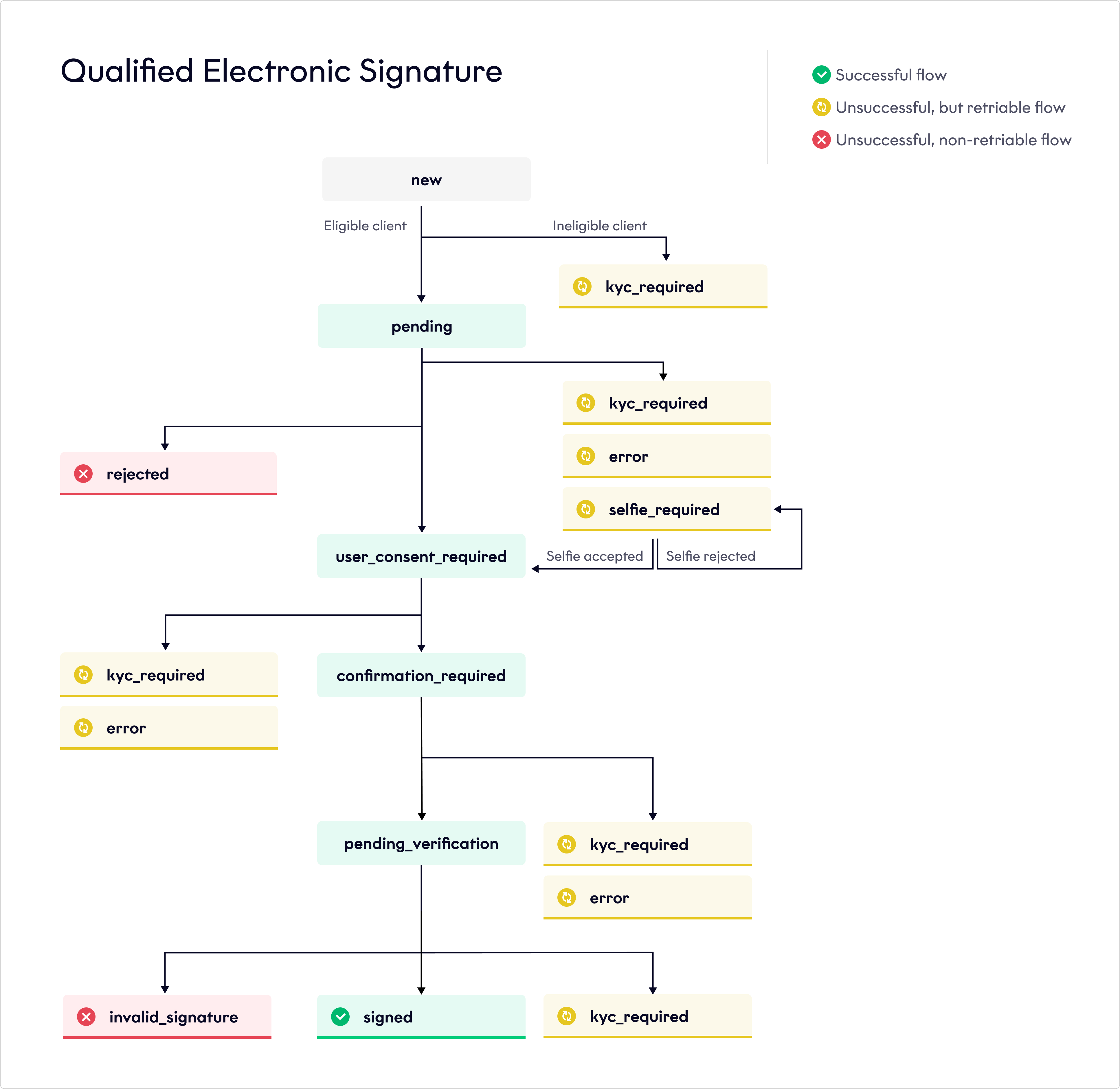
Qualified Electronic Signature status flow
Status codes
Statuses can be accompanied by one or multiple of the following status codes:
| Status code | Guidance |
|---|---|
140 | Description: We found a potential sanctions hit. Status: kyc_required Action: Create a new workflow that includes Identity Verification and Qualified Electronic Signature. |
1021 | Description: The ID document type in the successful Identity Verification case is not supported for this nationality. Status: kyc_required Action: Create a new workflow that includes Identity Verification and Qualified Electronic Signature. |
1035 | Description: The client is not eligible for a signature. Status: kyc_required Action: None. You cannot retry. |
1201 | Description: The Identity Verification case is not compliant. Status: kyc_required Action: Create a new workflow that includes Identity Verification and Qualified Electronic Signature. |
1202 | Description: The client is not eligible for a signature because the related Identity Verification case status is completed_unacceptable. Status: kyc_required Action: None. You cannot retry. |
3105 | Description: The signature flow selfie does not match the selfie in the Identity Verification case. Status: selfie_required Action: • SDK integration: Handled by the SDK. • API integration: Upload a new selfie. |
3204 | Description: The ID document used in the successful Identity Verification case is expired. Status: kyc_required Action: Create a new workflow that includes Identity Verification and Qualified Electronic Signature. |
3311 | Note: Pending verification flow only. Description: The certificate details do not match the ID document. Status: invalid_signature Action: Create a new workflow for Qualified Electronic Signature only. |
3541 | Description: The device model used for the signature flow does not match the one used for the Identity Verification case. Status: selfie_required Action: • SDK integration: Handled by the SDK. • API integration: Upload a new selfie. |
3550 | Description: The phone number of the device used for the signature flow does not match the one used for the Identity Verification case. Status: selfie_required Action: • SDK integration: Handled by the SDK. • API integration: Upload a new selfie. |
4110 | Description: We found a confirmed sanctions hit. The client is not eligible for a signature. Status: kyc_required Action: None. You cannot retry. |
6001 | Description: There was a fatal error while authorizing the signature. Status: error Action: If the status of the related Identity Verification case is: • completed_acceptable: Create a new workflow for Qualified Electronic Signature only. • inconsistent_data or invalid_data: Create a new workflow that includes Identity Verification and Qualified Electronic Signature. |
6002 | Description: There was an error while authorizing the signature. Status: user_consent_required Action: • SDK integration: Handled by the SDK. • API integration: Re-authorize the signature. |
6003 | Description: There was a communication error while authorizing the signature. Status: user_consent_required Action: • SDK integration: Handled by the SDK. • API integration: Re-authorize the signature. |
6004 | Description: There was a fatal error while signing the document(s). Status: error Action: If the status of the related Identity Verification case is: • completed_acceptable: Create a new workflow for Qualified Electronic Signature only. • inconsistent_data or invalid_data: Create a new workflow that includes Identity Verification and Qualified Electronic Signature. |
6005 | Description: There was an error while signing the documents. Status: Reverts to either user_consent_required or confirmation_required Action: • SDK integration: Handled by the SDK. • API integration: Re-confirm the signature. |
6006 | Description: There was a communication error while signing the documents. Status: Reverts to either user_consent_required or confirmation_required Action: • SDK integration: Handled by the SDK. • API integration: Re-confirm the signature. |
6007 | Note: Pending verification flow only. Description: There was a fatal error while countersigning the documents. Status: error Action: Create a new workflow for Qualified Electronic Signature only. |
6008 | Description: The signature flow timed out. If a signature flow remains in user_consent_required, selfie_required, or confirmation_required for more than 24 hours with no activity, the workflow automatically times out. In some cases, a signature may time out up to 47 hours after the last update. Example (scheduled job runs at 04:00 CEST / 02:00 UTC): • Day 1, 04:00 — last modification • Day 2, 04:00 (23h) — not yet eligible • Day 3, 04:00 (47h) — timeout Status: error Action: If the status of the related Identity Verification case is: • completed_acceptable: Create a new workflow for Qualified Electronic Signature only. • inconsistent_data or invalid_data: Create a new workflow that includes Identity Verification and Qualified Electronic Signature. |
6009 | Description: The signature flow was not initialized. Status: error Action: If the status of the related Identity Verification case is: • completed_acceptable: Create a new workflow for Qualified Electronic Signature only. • inconsistent_data or invalid_data: Create a new workflow that includes Identity Verification and Qualified Electronic Signature. |
6010 | Description: The client's mobile phone number is invalid. Status: error Action: If the status of the related Identity Verification case is: • completed_acceptable: Create a new workflow for Qualified Electronic Signature only and provide a valid mobile phone number. • inconsistent_data or invalid_data: Create a new workflow that includes Identity Verification and Qualified Electronic Signature. |
6011 | Description: The binding between the Identity Verification session and the signature authorization session was broken. Status: error Action: If the status of the related Identity Verification case is: • completed_acceptable: Create a new workflow for Qualified Electronic Signature only and provide a valid mobile phone number. • inconsistent_data or invalid_data: Create a new workflow that includes Identity Verification and Qualified Electronic Signature. Note: When creating a new QES-only workflow, a confirmation step using a one-time passcode (OTP) is required. |
6012 | Description: The binding between the Identity Verification session and the signature authorization session was broken. As a result, the signature cannot continue. Status: error Action: If the status of the related Identity Verification case is: • completed_acceptable: Create a new workflow for Qualified Electronic Signature only and provide a valid mobile phone number. • inconsistent_data or invalid_data: Create a new workflow that includes Identity Verification and Qualified Electronic Signature. Note: When creating a new QES-only workflow, a confirmation step using a one-time passcode (OTP) is required. |
6013 | Description: The binding between the Identity Verification session and the signature authorization session was broken. As a result, the signature cannot be initialized. Status: error Action: If the status of the related Identity Verification case is: • completed_acceptable: Create a new workflow for Qualified Electronic Signature only and provide a valid mobile phone number. • inconsistent_data or invalid_data: Create a new workflow that includes Identity Verification and Qualified Electronic Signature. Note: When creating a new QES-only workflow, a confirmation step using a one-time passcode (OTP) is required. |
6014 | Description: There was an error initializing the signature. Status: pending Action: Wait while the signature flow restarts automatically. |
6015 | Description: There is insufficient information in the Identity Verification to generate a certificate. Status: • pending — Identity Verification is still in progress. Certificate generation is waiting for the verification to complete with sufficient information. • error — Identity Verification has completed, but it did not provide enough information to generate a certificate. Action: • If pending: Wait for Identity Verification to complete. Certificate generation will continue automatically once sufficient information is available. • If error: The completed Identity Verification did not provide enough information to generate a certificate. Review the Identity Verification configuration and ensure it collects all required information. |
Note
For integration details, see Qualified Electronic Signature Integration.
Updated 7 days ago