
QES Component
App Components
Use the QES Component to run Qualified Electronic Signature as a workflow module on an existing workflow session.
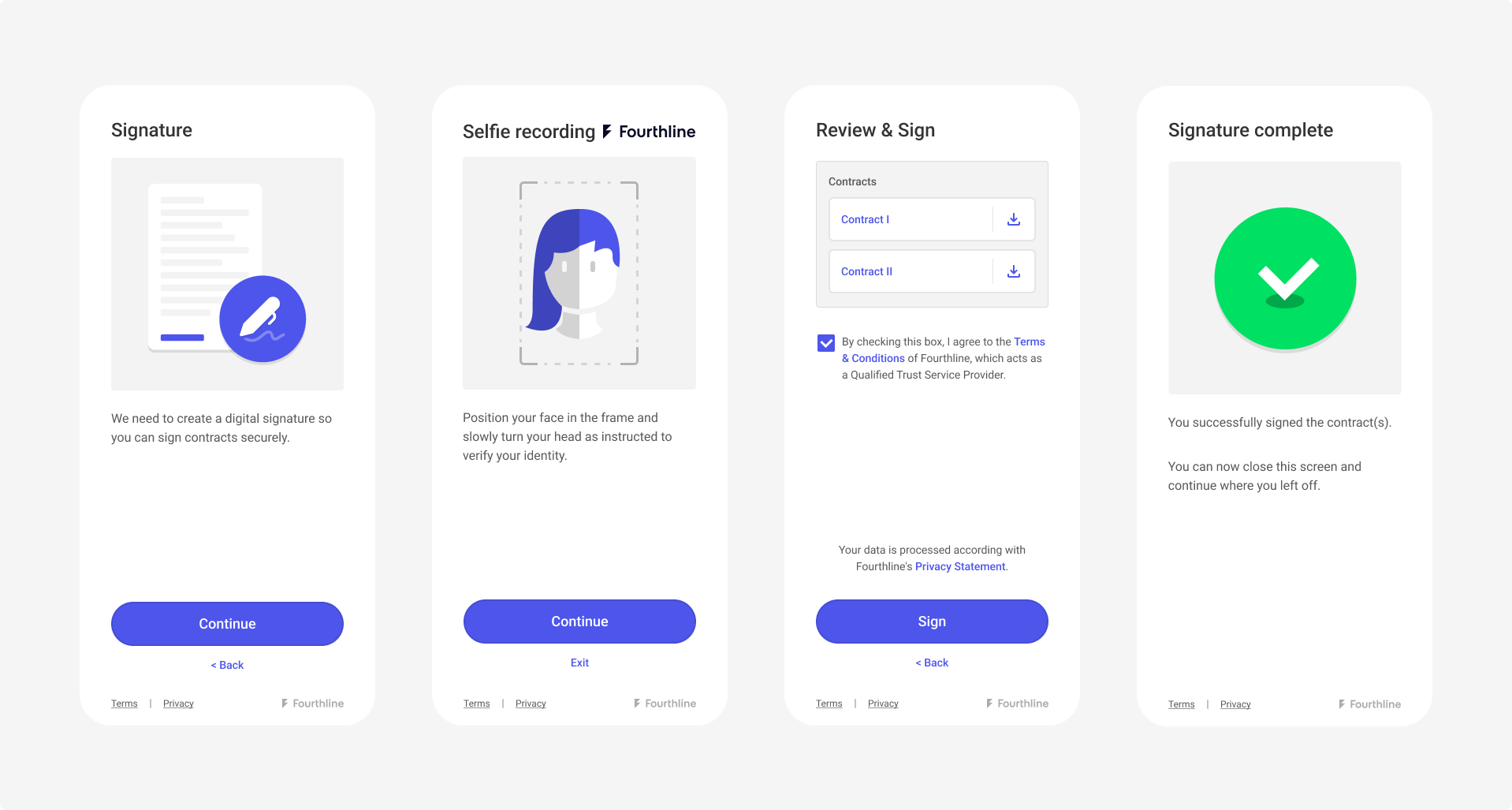
QES Component
Note
The QES Component is available only in the native Android and iOS SDKs. It is not available in the Cordova, Flutter, or React Native plugins.
For more information, see: QES integration guide and Get workflow status.
Before you begin
-
Start a workflow session first (
Orca.workflowSession), then callqesComponent.The component loads QES configuration and signature status before any SDK UI is shown. If preparation fails, the host receives
onProductCompletedwith a failure andonPresentationStartedis not called. -
Complete Identity Verification. If Identity Verification is not complete, QES returns
qes.kyc_requiredwithout presenting the SDK UI.
QES workflow
Depending on the data already available, the QES workflow can include:
- Location
- Selfie
- Agreements
- OTP Sign
The Location and Selfie steps can be skipped if the required data is already available.
After successful OTP authorization, the SDK uploads the collected data to Fourthline.
Configuration
The QES Component does not require a document type or issuing country.
To customize its appearance, use OrcaFlavor through QesCustomizationConfig. See App UI Customization.
Presentation callbacks
present exposes two callbacks:
| Callback | When it is called |
|---|---|
onPresentationStarted | Preparation succeeded and the SDK is about to show UI. Hide any host loading indicator here. Not called when preparation fails. |
onProductCompleted | The component finishes once (success, user cancel, or failure). Always handle the result here, and hide the loading indicator if it is still visible. |
If your app shows a loading indicator before calling present, hide it in onPresentationStarted. If preparation fails, hide it in onProductCompleted instead.
Success handling
A successful onProductCompleted callback means that the client completed the QES workflow in the SDK. It does not confirm that the qualified electronic signature is legally complete.
After the component is dismissed, useGet workflow status or your webhook to determine the final signature status. Do not use the SDK completion result as the source of truth for the signature status.
The completion callback returns Unit on Android and Void on iOS. It does not return scanned images or signed PDFs.
Error handling
The QES Component returns WorkflowFailure when signing fails or cannot proceed. Starting a workflow session with Orca.workflowSession returns WorkflowError instead.
QES-specific failure codes use the qes.* prefix. Shared failure codes, such as session.*, transport.*, and user.canceled, also apply to other components.
The WorkflowFailure object provides the following fields:
| Field | Android | iOS | Use |
|---|---|---|---|
| Stable identity | code (WorkflowFailureCode, identifier) | code (WorkflowFailureCode, rawValue) | Branch on known constants. Include an else or default case to handle codes added in later SDK versions. |
| Next host step | recovery (WorkflowRecoveryAction) | recovery (WorkflowRecoveryAction) | Determine the appropriate recovery action, such as retrying, waiting, starting a new workflow, or completing identity verification. |
| Log text | message | description | Use for logging only. Do not parse this value for UI or branching logic. |
Recovery actions
Use recovery to determine the next action and code to handle specific outcomes, such as user.canceled and qes.signature_completed.
Both have an unrecoverable recovery action, but neither represents a retryable QES error.
For available recovery actions, see Configuration → Error handling → WorkflowFailure.
Failure codes (qes.*)
qes.*)| Code | Description |
|---|---|
qes.kyc_required | Identity verification must be completed before QES can start. |
qes.pending_verification | The signature is waiting for identity verification to finish. |
qes.signature_rejected | The client is not eligible for the QES workflow. |
qes.invalid_signature | Certificate details do not match the identity verification case. |
qes.signature_completed | The qualified electronic signature has already been completed. |
qes.signature_error | The QES signature status is invalid and the component cannot start. |
qes.too_many_otp_requests | The OTP code was requested too many times. |
qes.too_many_authorization_attempts | The documents were authorized too many times. |
qes.qtsp_session_invalid | The QTSP rejected the signing session. |
qes.unexpected | An unexpected QES error occurred. |
Testing
Start a TestMe session with a mock validation code that includes QES (for example QES):
import com.fourthline.networking.NetworkEnvironment
import com.fourthline.orca.Orca
import com.fourthline.orca.core.flavor.OrcaFlavor
import com.fourthline.orca.qes.QesCustomizationConfig
import com.fourthline.orca.workflow.WorkflowConfig
import com.fourthline.orca.workflow.WorkflowFailure
import com.fourthline.orca.workflow.WorkflowSession
import com.fourthline.orca.workflow.workflowSession

fun startSession(context: Context) {
  val config = WorkflowConfig(networkEnvironment = NetworkEnvironment.Mock)

  Orca
    .workflowSession(
      context = context,
      validationCode = "QES",
    )
    .configure(config)
    .start { result ->
      result.fold(
        onSuccess = { session ->
          launchQesComponent(context, session)
        },
        onFailure = { workflowError ->
          print("Handle error... $workflowError")
        }
      )
    }
}

fun launchQesComponent(context: Context, session: WorkflowSession) {
  session
    .qesComponent(context)
    .customize(QesCustomizationConfig(OrcaFlavor()))
    .present(
      onPresentationStarted = {
        // Hide the host loading indicator; the SDK UI is about to be shown
      },
      onProductCompleted = { result ->
        result.fold(
          onSuccess = {
            print("QES component completed. Query backend status...")
          },
          onFailure = { throwable ->
            val failure = throwable as? WorkflowFailure
            print("Handle error... ${failure?.code?.identifier} ${failure?.recovery}")
          }
        )
      },
    )
}
import FourthlineSDK
override func viewDidLoad() {
super.viewDidLoad()
let configuration = WorkflowConfig(
networkEnvironment: .mock
)
Orca
.workflowSession(validationCode: "QES")
.configure(with: configuration)
.start { [weak self] result in
switch result {
case let .success(session):
self?.launchQesComponent(session)
case let .failure(workflowError):
print("Handle error...\(workflowError)")
}
}
}
func launchQesComponent(_ session: WorkflowSession) {
session
.qesComponent()
.customize(with: QesCustomizationConfig(flavor: OrcaFlavor()))
.present(
onPresentationStarted: {
// Hide the host loading indicator; the SDK UI is about to be shown
},
onProductCompleted: { result in
switch result {
case .success:
print("QES component completed. Query backend status...")
case let .failure(failure):
print("Handle error...\(failure.code.rawValue) \(failure.recovery)")
}
}
)
}Example
The following is a complete example:
import com.fourthline.networking.NetworkEnvironment
import com.fourthline.orca.Orca
import com.fourthline.orca.core.flavor.OrcaFlavor
import com.fourthline.orca.core.flavor.OrcaFonts
import com.fourthline.orca.qes.QesCustomizationConfig
import com.fourthline.orca.workflow.WorkflowConfig
import com.fourthline.orca.workflow.WorkflowFailure
import com.fourthline.orca.workflow.WorkflowFailureCode
import com.fourthline.orca.workflow.WorkflowRecoveryAction
import com.fourthline.orca.workflow.WorkflowSession
import com.fourthline.orca.workflow.workflowSession
import java.io.File

fun startSession(context: Context) {
    val validationCode = "xxxxxxxx" // generated by calling POST https://{{baseUrl}}/v1/workflows/{{workflowId}}/validationcode

    val config = WorkflowConfig(networkEnvironment = NetworkEnvironment.Sandbox)

    Orca
      .workflowSession(
        context = context,
        validationCode = validationCode,
      )
      .configure(config)
      .start { result ->
        result.fold(
          onSuccess = { session ->
            launchQesComponent(context, session)
          },
          onFailure = { workflowError ->
            print("Handle error... $workflowError")
          }
        )
      }
}

fun launchQesComponent(context: Context, session: WorkflowSession) {
    val customFlavor = OrcaFlavor(
      fonts = OrcaFonts(
        screenHeader = OrcaFonts.Font.FromFontRes(fontRes = R.font.roboto_medium, size = 20),
        primaryButton = OrcaFonts.Font.FromFile(file = File(...), size = 18),
      ),
    )

    session
      .qesComponent(context)
      .customize(QesCustomizationConfig(customFlavor))
      .present(
        onPresentationStarted = {
          // Hide the host loading indicator; the SDK UI is about to be shown
        },
        onProductCompleted = { result ->
          result.fold(
            onSuccess = {
              print("QES component completed. Query backend status...")
            },
            onFailure = { throwable ->
              val failure = throwable as? WorkflowFailure ?: return@fold
              when (failure.code) {
                WorkflowFailureCode.Qes.KycRequired -> print("Complete IDV first")
                WorkflowFailureCode.Qes.PendingVerification -> print("Wait for status")
                WorkflowFailureCode.User.Canceled -> print("User canceled")
                else -> print("Handle ${failure.code.identifier}")
              }
              when (failure.recovery) {
                WorkflowRecoveryAction.CompleteIdv -> { }
                WorkflowRecoveryAction.Wait -> { }
                WorkflowRecoveryAction.Retry -> { }
                WorkflowRecoveryAction.NewValidationCode -> { }
                WorkflowRecoveryAction.NewWorkflow -> { }
                WorkflowRecoveryAction.Unrecoverable -> { }
              }
            }
          )
        },
      )
}
import FourthlineSDK
override func viewDidLoad() {
super.viewDidLoad()
let configuration = WorkflowConfig(
networkEnvironment: .sandbox // choose .mock to test Workflow offline or .sandbox/.production to test networking
)
let validationCode = "xxxxxxxx" // generated by calling POST https://{{baseUrl}}/v1/workflows/{{workflowId}}/validationcode
Orca
.workflowSession(validationCode: validationCode)
.configure(with: configuration)
.start { [weak self] result in
switch result {
case let .success(session):
self?.launchQesComponent(session)
case let .failure(workflowError):
print("Handle error...\(workflowError)")
}
}
}
func launchQesComponent(_ session: WorkflowSession) {
var orcaFlavor = OrcaFlavor()
var palette = OrcaPalette()
palette.primary = UIColor(red: 82.0 / 255.0, green: 30.0 / 255.0, blue: 135.0 / 255.0, alpha: 1)
var colors = OrcaColors(colorPalette: palette)
colors.hint.backgroundColor = UIColor(red: 221.0 / 255.0, green: 210.0 / 255.0, blue: 232.0 / 255.0, alpha: 0.5)
orcaFlavor.colors = colors
session
.qesComponent()
.customize(with: QesCustomizationConfig(flavor: orcaFlavor))
.present(
onPresentationStarted: {
// Hide the host loading indicator; the SDK UI is about to be shown
},
onProductCompleted: { result in
switch result {
case .success:
print("QES component completed. Query backend status...")
case let .failure(failure):
switch failure.code {
case .Qes.kycRequired:
print("Complete IDV first")
case .Qes.pendingVerification:
print("Wait for status")
case .User.canceled:
print("User canceled")
default:
print("Handle \(failure.code.rawValue)")
}
switch failure.recovery {
case .completeIdv, .wait, .retry, .newValidationCode, .newWorkflow, .unrecoverable:
break
}
}
}
)
}Updated about 6 hours ago