
Reports
Integration Guides API v2
Reports contain the final results and supporting data for a workflow. Retrieve a report after Fourthline finishes processing the workflow.
Reports are available in the following formats:
- JSON for programmatic processing
- ZIP archives for audit and compliance workflows
- PDF for human-readable review
- XML for structured exports
Report availability
The reports you can retrieve depend on the workflow and product status.
In most cases, all report formats are available after the workflow is completed. There are some exceptions:
- JSON reports are available at any stage of the workflow.
- XML reports are also available when the workflow status is
failed. - PDF and ZIP reports are not available when the Identity Verification product status is
inconsistent_data.
| Product status | Workflow status | JSON | ZIP | XML | |
|---|---|---|---|---|---|
completed | completed | ✅ | ✅ | ✅ | ✅ |
rejected | completed | ✅ | ✅ | ✅ | ✅ |
inconsistent_data | completed | ✅ | ❌ | ❌ | ✅ |
invalid_data | failed | ✅ | ❌ | ❌ | ✅ |
new / pending | new / pending | ✅ | ❌ | ❌ | ❌ |
Note
Reports are generated asynchronously, so they might not be available immediately after the workflow reaches the required status. If a report request returns
404 Not Foundor409 Conflict, wait and trying again, increasing the wait time between attempts until the report is available.
ZIP archive contents
The ZIP archive includes one or more of the following, depending on the workflow configuration:
- PDF report
- XML export
- Uploaded identity media
- Extracted workflow data
XML export
An XML export can include:
- Extracted identity data, including:
- Document type
- Issuing country
- Expiration date
- Corrected identity data
- References to uploaded files
File paths in the XML reference uploaded media included in the archive, such as document images, selfies, and videos.
Example ZIP archive structure
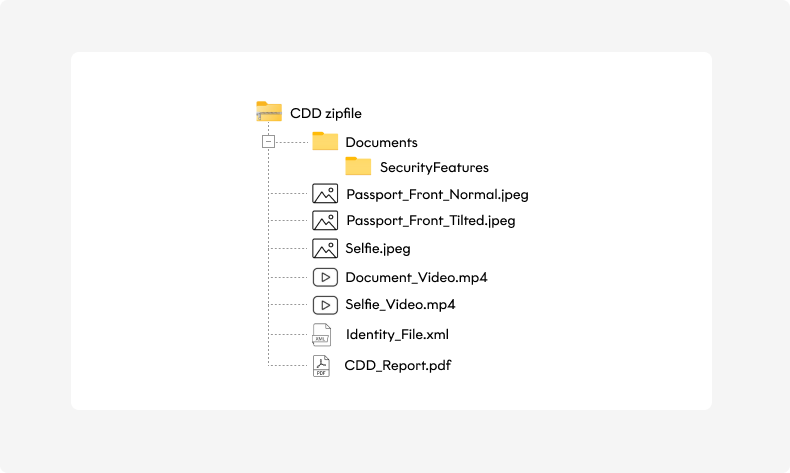
Example ZIP archive structure
PDF report contents
PDF reports can include the following sections depending on the workflow configuration and enabled products.
| Section | Contents |
|---|---|
| Cover page | Workflow outcome, identifiers, timestamps, configured products, and recommended actions |
| Disclaimer | Terms and conditions for the generated report |
| Checks overview | High-level summary of the areas that were checked |
| Personal data | Extracted and corrected identity data |
| Tax information | Country of taxation and TIN information |
| Identity files | Uploaded identity files and extracted document data |
| Risk category | Final workflow risk assessment |
| Agent details | Processing and review agent information |
| AML screening | Screening databases, hit types, and review outcomes |
| Identity media | Selfies, document images, videos, and security feature assessments |
| Document address | Address extracted from the identity document |
| Document type | Document type extracted from the identity document, for example Passport or National ID Card |
| Document issuing country | Issuing country extracted from the identity document. Format: ISO 3166-1 alpha-3 |
| Document expiration date | Expiration date extracted from the identity document. Format: YYYY-MM-DD |
JSON report examples
Responses from Get report as JSON.
identityData.tax is on the Identity Verification product. It is populated when tax collection is enabled for the workflow and a value was supplied or corrected during review. App Drop-in and Web SDK capture it when the Tax Number module is enabled. For API-only and App Components, send identityData.tax on Upload client data.
When tax was not collected, the report usually still includes an empty object:
"tax": {}When tax data is present, the object contains:
| Field | Meaning |
|---|---|
countrySubjectToTaxation | ISO 3166-1 alpha-3, uppercase, for example ESP |
tin | Client tax identification number |
usPerson | Whether the client is a U.S. person. Often the string yes or no |
usTin | U.S. tax identification number, 123-45-6789 when present |
"tax": {
  "countrySubjectToTaxation": "ESP",
  "tin": "999999999",
  "usPerson": "no",
  "usTin": "123-45-6789"
}
Upload client data accepts usPerson as true or false. Report payloads often use the string yes or no. Consumers of Get report as JSON should use the value in the response.
Review can fill or correct tin. When the client provides a TIN document outside the configured regulatory scope, the report does not include the TIN. tin can also be N/A when a value exists and Fourthline cannot verify it, [NOT PROVIDED] when nothing was inputted or extracted, or an empty string when the value is not available.
{
  "tenant": "{{tenant}}",
  "workflowId": "{{workflowId}}",
  "workflow": "IdvAndQesWorkflow",
  "workflowStatus": "completed",
  "clientId": "{{clientId}}",
  "products": [
    {
      "name": "IdentityVerification",
      "lastModified": "2026-04-17T13:00:04.6382611+02:00",
      "identityData": {
        "personalData": {
          "firstName": "{{firstName}}",
          "lastName": "{{lastName}}",
          "gender": 2,
          "placeOfBirth": "{{placeOfBirth}}",
          "countryOfBirth": "ESP",
          "birthDate": "1965-03-10T00:00:00Z",
          "nationality": "NLD"
        },
        "address": {
          "streetName": "{{streetName}}",
          "streetNumber": "{{streetNumber}}",
          "city": "{{city}}",
          "country": "ESP",
          "postalCode": "{{postalCode}}"
        },
        "contactDetails": {
          "email": "{{email}}",
          "phone": "{{phoneNumber}}",
          "mobile": "{{mobileNumber}}"
        },
        "tax": {},
        "deviceMetaData": {
          "language": "ES",
          "model": "iPhone 12 Pro Max",
          "sdkVersion": "4.1.0"
        }
      },
      "identityDocumentData": {
        "documentNumber": "{{documentNumber}}",
        "documentType": 0,
        "issuingCountry": "NLD",
        "expirationDate": "2031-08-30",
        "issueDate": "2021-08-30"
      }
    },
    {
      "name": "Signatures",
      "productStatus": "signed",
      "lastModified": "2026-04-17T11:00:17.950744Z"
    }
  ],
  "receivedData": {
    "files": [
      {
        "type": "SelfieImage",
        "fileName": "{{selfieFileName}}"
      },
      {
        "type": "DocumentImage",
        "side": "Front",
        "documentId": "{{documentId}}"
      },
      {
        "type": "DocumentToSign",
        "fileName": "{{documentToSignFileName}}"
      }
    ]
  },
  "sla": {
    "withinSla": true
  },
  "risk": {
    "conclusion": "Low",
    "statusCode": 200,
    "description": "Low"
  }
}
Updated about 11 hours ago