
Archive
This page highlights the Release Notes from 2025.
December 2025
German eID
 Improved
We improved the user experience for the German eID verification flow on iOS.
After selecting Continue with eID, the Continue button now displays a loading spinner while the Ausweis SDK initializes, providing clearer feedback that the process is in progress.
This helps reduce user uncertainty during the initialization step and improves overall flow clarity.
Read more about our newest product eID Verification. To test or enable this module, contact your Fourthline delivery manager.
Fourthline Hub
 Added
Added
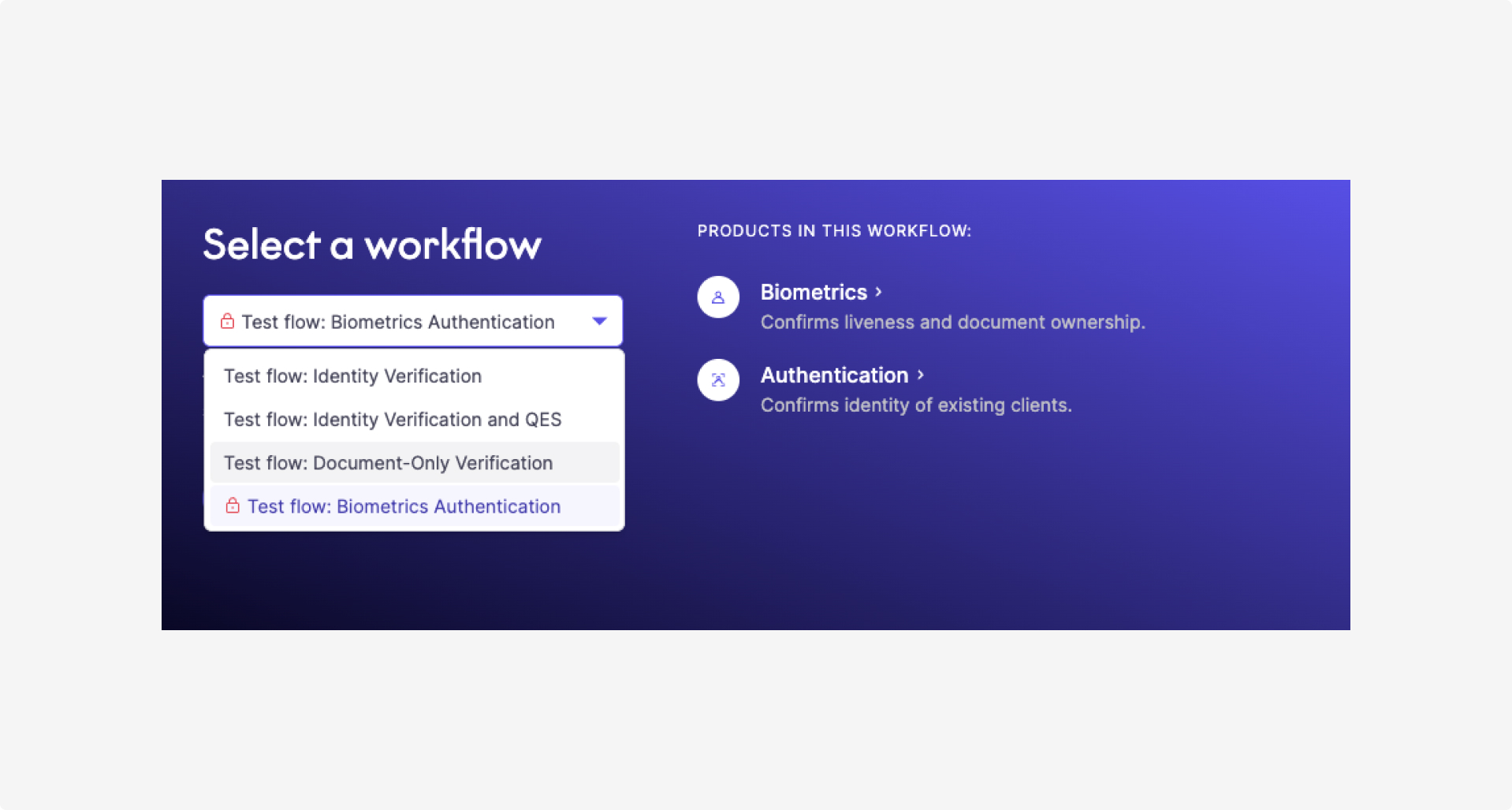
We added a new test flow, Biometric Authentication.
This workflow becomes available after successfully completing any other test flow that includes the Biometrics product.
November 2025
eID Verification
Added
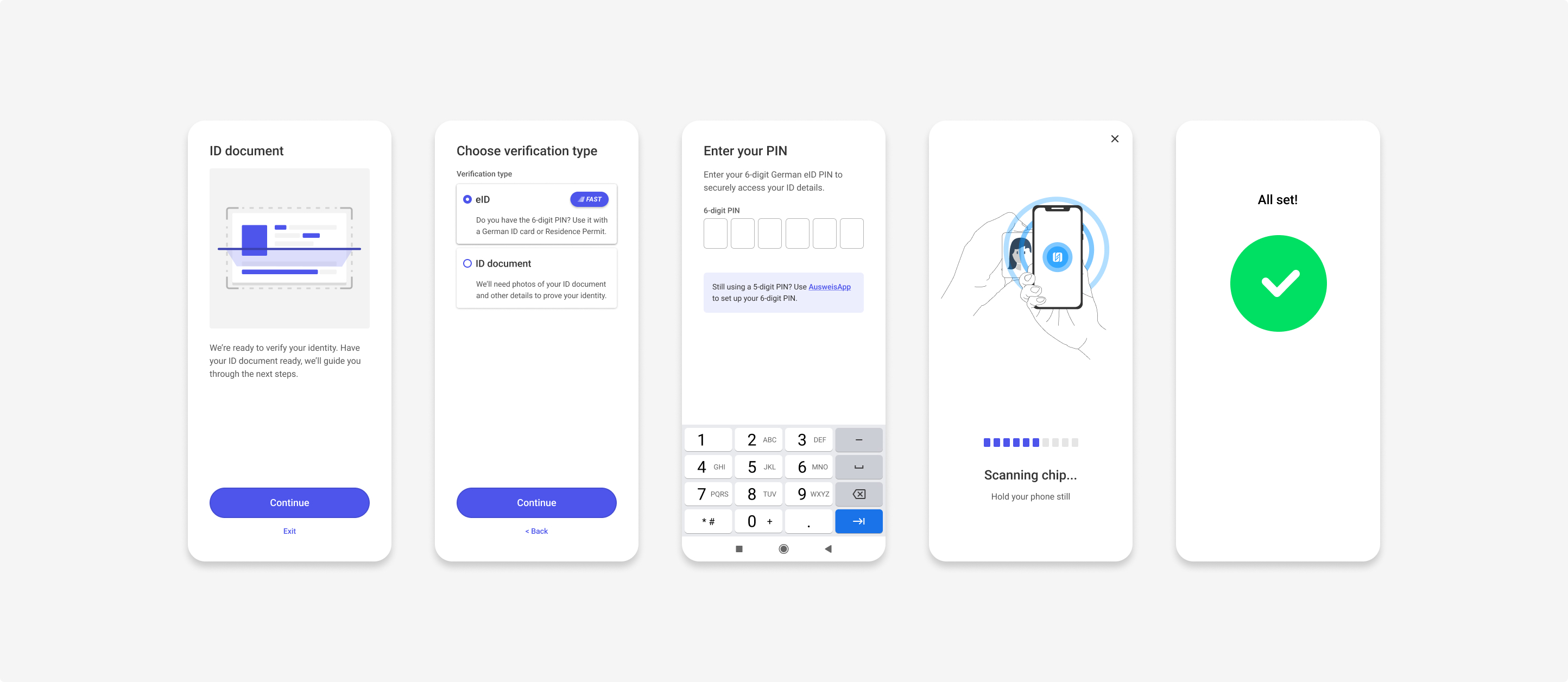
We launched eID Verification and added iOS and Android support for a new module that enables identity verification with the German eID for the German market.
To test and enable this module, contact your Fourthline delivery manager.
Benefits
- Faster and fully digital identity verification for German clients.
- Higher verification accuracy through eID-backed data points.
- Enhanced fraud prevention by combining eID Verification with Biometrics, AML, and Location.
- Compliant with German regulations.
Fourthline Hub
Added
We added SDK Journey Tracking: end-to-end visibility into how clients progress through the onboarding flows.
Benefits
- Real-time visibility: Journey data updates live as clients move through the SDK — no need to wait for the flow to complete.
- Earlier insights: Access journey information immediately, without waiting for a final case verdict.
- Better troubleshooting: Identify where clients drop off or encounter issues to optimize the onboarding experience.
Improved
-
Media Files Access: We improved support and troubleshooting with direct access to client-uploaded documents and selfies.
Benefits
- Immediate availability: Images appear as soon as the client uploads them.
- Role-based access: Viewing media requires the new Identity data access user role, which your Hub administrator can assign via the Users page.
- 30-day visibility window: Media files remain accessible for up to 30 days after the last case update. For older cases, you can continue using the Case Review Portal for deeper fraud analysis.
-
We introduced automated email notifications to improve visibility and reduce manual follow-up:
- Admins receive a notification when a new user signs up and requires access approval.
- Users receive a notification once their access request is approved and their role(s) are confirmed.
These improvements help streamline our Business Partners’ support operations and accelerate case handling.
Read more in Fourthline Hub.
Mobile SDK
Added
iOS 3.4.1 and cross-platform SDKs 2.4.1 (React Native, Cordova, Flutter): We added Swift Concurrency support. This release also includes important integration updates for Swift 6 compatibility.
October 2025
Android support change
Improved
From SDK version 3.3.0 onwards, Android 6 is no longer supported.
Supporting operating system versions that do not receive security updates significantly increases the risk of vulnerabilities being exploited and user accounts being compromised.
Only 0.7% of users in Europe currently use a device running Android 6.
Fourthline Hub
Added
-
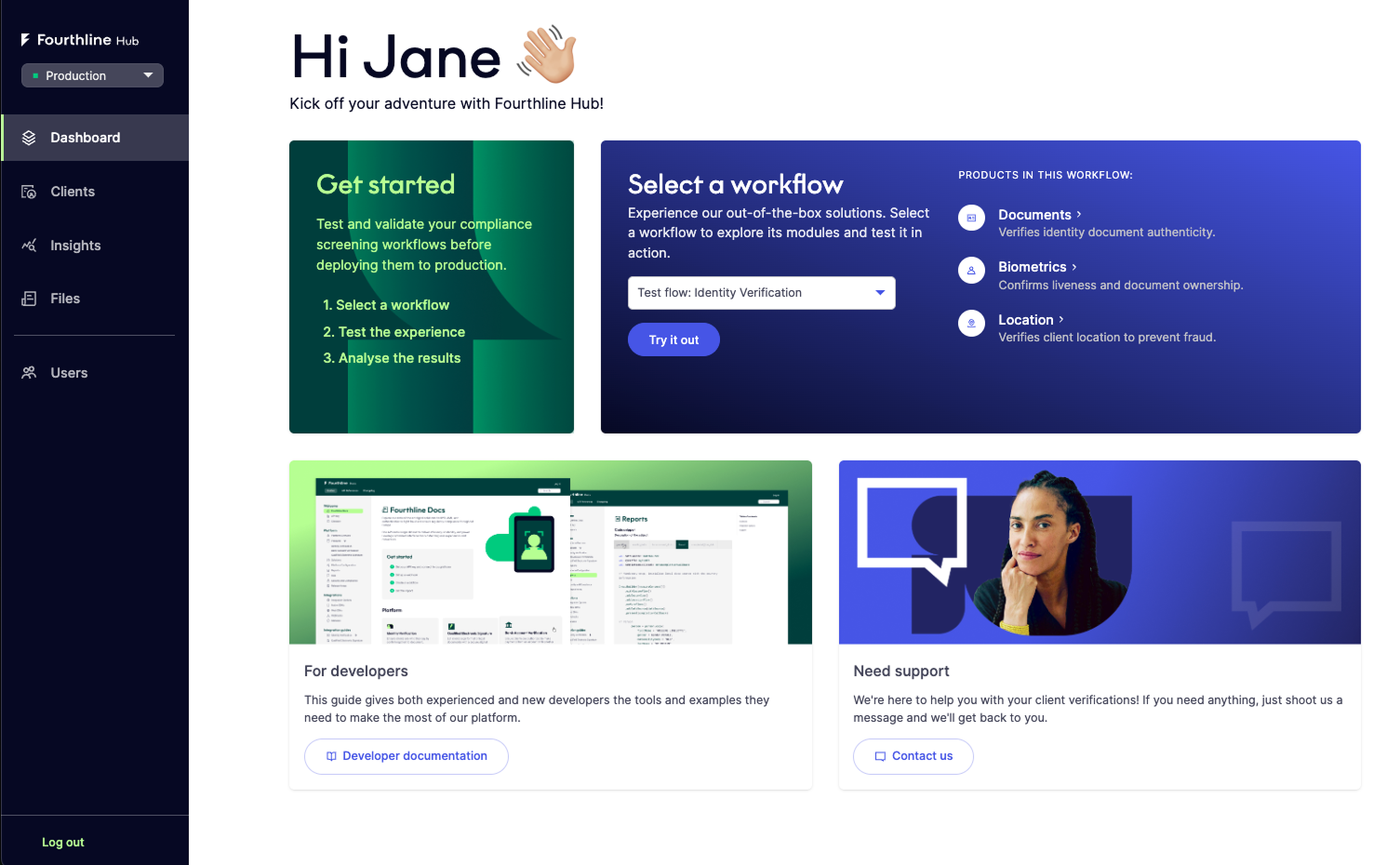
We released a 14-day trial that lets you test Fourthline’s workflows in an almost real
life environment - including real compliance checks and, where applicable, manual review.Trial flows use predefined configurations and are validated by the same compliance engines as production.
Read more in Trial.
-
We introduced monthly security reports in Hub. As a Fourthline Business Partner, you can now access key metrics and trends each month and download the reports from the new Files page.
Read more in Overview.
-
In Hub, we added two account types, depending on your current relationship with Fourthline:
Business Partner account: For organizations that have a signed commercial agreement with Fourthline.
Prospect account: For organizations that do not yet have a signed commercial agreement with Fourthline.
Read more in Account types.
-
We improved the Verifications timeline UI for reviewing a specific client’s journey. An update to the SDK user journey will follow soon.
Mobile SDK
Improved
We updated dependencies to the latest supported versions to improve compatibility and reduce the risk of issues or crashes with:
| Dependency | Version |
|---|---|
| AGP | 8.13.0 |
| Kotlin | 2.2.20 |
| Kotlin Serialization | 1.9.0 |
| Kotlin Coroutines | 1.10.2 |
| Compose BOM | 2025.09.01 |
| Compose Plugin | 1.9.0 |
| Compose Activity | 1.11.0 |
| Compose Navigation | 2.9.5 |
| Compose Accompanist | 0.36.0 |
| Compose Accompanist Permissions | 0.37.3 |
| AndroidX Core KTX | 1.17.0 |
| AndroidX Activity KTX | 1.11.0 |
| AndroidX Lifecycle | 2.9.4 |
| AndroidX Browser | 1.9.0 |
| AndroidX AppCompat | 1.7.1 |
| CameraX | 1.5.0 |
| Dagger | 2.57.2 |
| Ktor | 3.3.0 |
| JMRTD | 0.8.3 |
| Lottie | 6.6.10 |
| Snowplow Tracker | 6.2.0 |
 Fixed
Fixed
-
iOS 3.2.23: We fixed an issue where the document scanner could crash if the device camera was not available. It now returns an
Unknownerror instead. -
iOS 3.2.22/Android (cross-platform integration): We fixed an issue where the Contact Details screen defaulted the phone country to NL.
Since iOS can no longer access SIM provider data (Apple removed this capability from iOS 17 onwards), the default country is now selected in this order: phone locale → document issuing country → NL (fallback).
This improves the client experience by reducing manual effort when entering phone number details.
Identity Verification
Added
We introduced a new field for Austrian and German markets: AcademicTitle. It represents the client's academic or honorific title (e.g. PROF).
Get in touch with your Fourthline delivery manager to configure this country-specific field.
September 2025
Fourthline Hub
Added
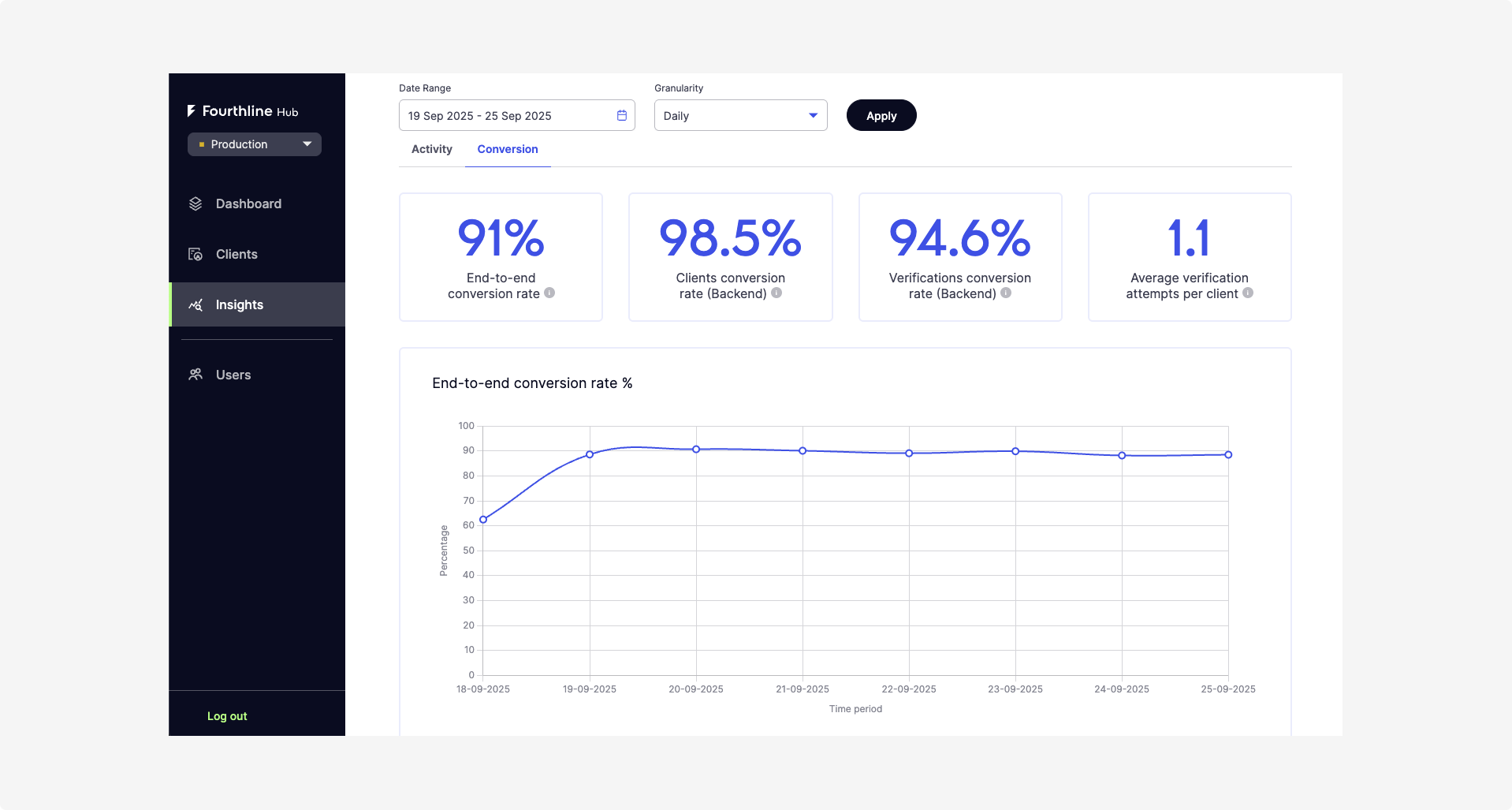
We launched Fourthline Hub - your new space to manage compliance and turn it into a business advantage. For now, Hub is accessible only to existing Business Partners.
What can you do in Hub?
- Use Insights dashboards to quickly track performance and identify bottlenecks with graphs such as the Verifications within SLA%.
- Explore the Conversion tab to see end-to-end and backend conversion rates, plus top failure reasons.
- Navigate clients more easily with a full timeline, ID, and related verifications in one click.
- Test like a client the Web SDK by creating Sandbox verifications with predefined configurations.
- ... and much more.
Accessibility
Improved
- We improved the Android selfie module to make it more accessible for users with vision impairments, bringing it in line with the iOS version. Available in Android SDK 3.2.19 and cross-platform SDKs (Cordova, React Native, Flutter) 2.2.19.
- We improved accessibility in the Web SDK (v1.24.8). Screen readers now correctly ignore decorative elements such as logos, country flags, and input clear buttons, creating a smoother experience for all users.
Mobile SDK
Fixed
We fixed an issue in the Qualified Electronic Signature workflow that could make documents temporarily unavailable and cause crashes on Android devices. Available in Android SDK 3.2.18 and cross-platform SDKs (Cordova, React Native, Flutter) 2.2.18.
August 2025
Bank Account Verification
Added
We added the POST /v1/referencepayments/test/simulatepayments endpoint to help you simulate a payment in the Bank Account Verification (BAV) workflow. Use it to test end-to-end workflows in Sandbox without sending real transfers.
Identity Verification Solutions
Added
We introduced a bank-grade, lightweight onboarding solution for the UK that minimizes user friction while meeting regulatory requirements.
Mobile SDK
Fixed
We resolved an issue where NFC scanning for NL passports did not work. It now works as expected in versions 3.2.17 and higher.
Fourthline Docs
Improved
We redesigned the Identity Verification Solutions page with easier access to local compliant solutions.
July 2025
Biometrics
-
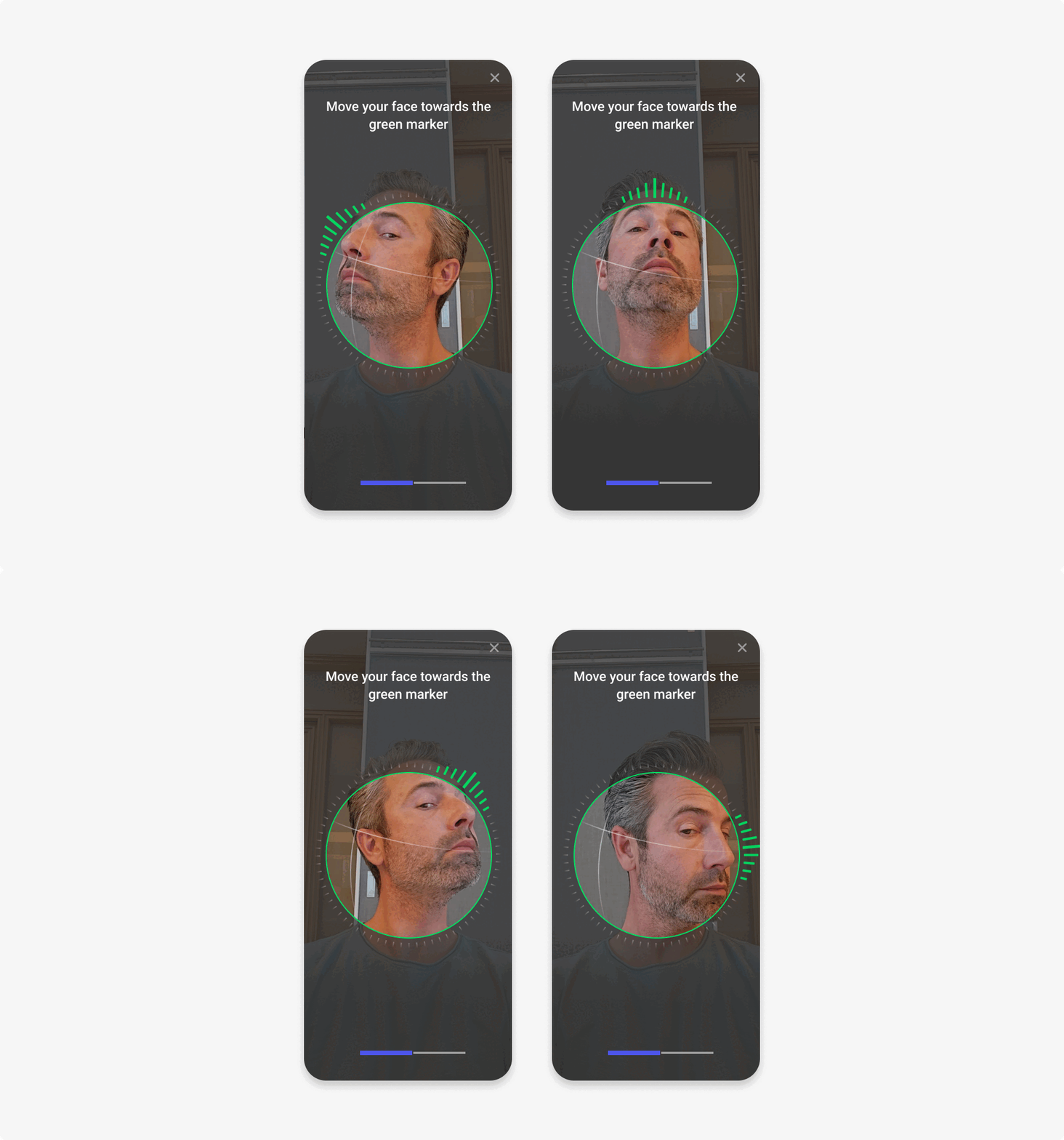
We introduced Random Liveness, a new liveness module where users perform randomized head movements to confirm they’re physically present. For more information regarding Configurations, please see Identity Verification integration.
This module follows European Guidelines on Remote Customer Onboarding Solutions under Article 13(1) of Directive (EU) 2015/849, and strengthens protection against identity fraud while maintaining a seamless user experience.
Authentication
- We've renamed our Client Authentication solution to Biometric Authentication. Biometric Authentication is supported in both v1 and v2 integrations.
Mobile SDK
- We improved accessibility on the Document type screen.
- We improved screen reader support across desktop views, alerts, pop-ups, and the document flow.
- We improved video recording timing to ensure all sides of the document are captured efficiently.
- Fix (native iOS SDK version 3.2.10): We resolved an issue where video recording could fail during the automatic passport verification step.
Web SDK
Accessibility improvements: We’ve identified areas where our Web SDK can be improved to better support accessibility. Key updates include:
- Improved screen reader support for better navigation and context.
- Accordion components now follow proper ARIA roles, and support proper keyboard navigation and interaction patterns.
- Localization improvements include accessible input error messages, descriptive alt text for scanners, and clearer navigation labels.
June 2025
Mobile SDK
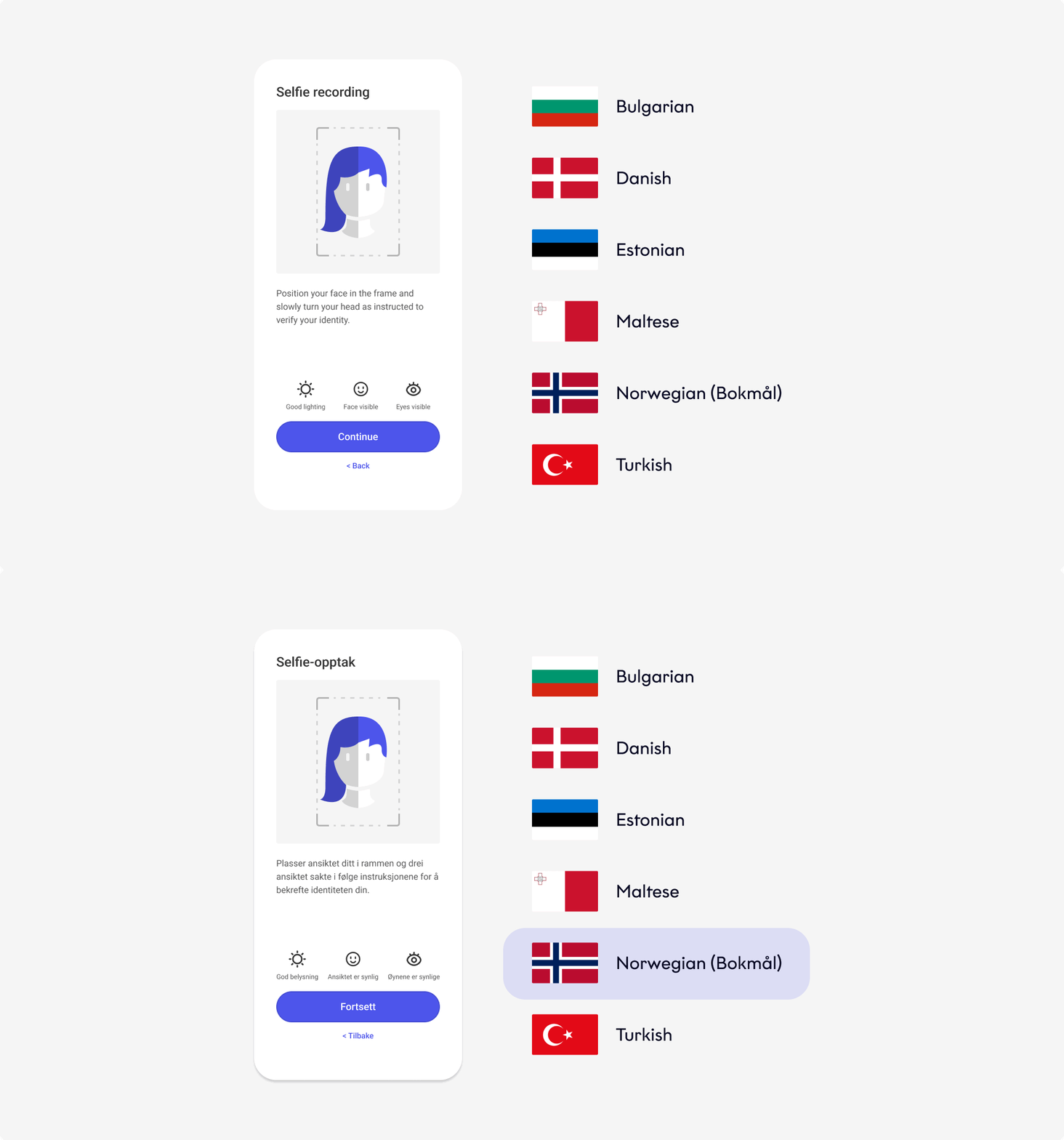
Localization improvements & country expansion: We’ve expanded our localization capabilities to support six new languages in our mobile and cross-platforms SDKs:
- Bulgarian
- Danish
- Estonian
- Maltese
- Norwegian
- Turkish
This update helps our Business Partners reach a broader audience, enhance the user experience, and increase conversion rates by making identity verification more accessible to users in key markets.
Accessibility improvements: We continuously improve the accessibility of our iOS, Android, and cross-platform plugin SDKs to comply with EAA requirements, aligning with WCAG 2.1 and WCAG 2.2 Level A and AA criteria.
This month, we published the Fourthline SDK Accessibility Statement and focused on accessibility improvements in the following SDK flows:
- iOS: Physical Proof of Address (PoA), Documents, Tax Number (TIN), Document NFC.
- Android: Qualified Electronic Signature (QES).
These improvements are designed to support users with vision, dexterity, or mobility challenge and include:
- We improved the screen reader navigation. The UI elements are now announced in a logical, meaningful order.
- We updated our UI test automation and QA test coverage to reflect the accessibility enhancements.
- We improved localized text consistency: Ensured all text is accurate and compliant across supported languages and locales.
- Only for iOS, we enhanced screen reader support for Selfie Liveness: Improved compatibility to better support users with visual impairments.
- We added accessible pop-ups. All dialogs are fully readable by screen readers.
- We added localized image descriptions (ALT text). All ALT texts are now translatable for accurate localization across markets.
- Fix (native iOS SDK version 3.2.8): We resolved an issue where users were unable to progress from the QES sign screen. This is now fixed in iOS version 3.2.8 and above.
- Fix (native Android SDK version 3.2.8): We resolved a crash that could occur when canceling a document capture flow from a dialog.

- Known issue: We identified an issue affecting the Qualified Electronic Signature (QES) sign screen.
- Business Partners using QES are advised to update to version 3.2.8 or any newer release to resolve the issue.
- Business Partners not using QES can still upgrade to benefit from the accessibility enhancements included in this release. However, if QES is enabled, we strongly recommend updating to the latest available version.
Web SDK
Accessibility improvements: We continuously improve the accessibility of our Web SDKs to comply with EAA> requirements, aligning with WCAG 2.1 and WCAG 2.2 Level A and AA criteria.
This month, we published the Fourthline SDK Accessibility Statement and focused on improvements to better support users with vision, dexterity, or mobility challenges. These include:
- We removed unnecessary announcements for decorative elements. Users no longer hear screen rotation tips or unrelated content for non-essential graphics, resulting in a clearer, less distracting experience.
- We improved scanner image accessibility. Scanner images are now either hidden from screen readers or labeled appropriately, ensuring only meaningful content is announced.
- We made radio buttons fully accessible. Users can now navigate and select radio options using screen readers and keyboards, with proper focus handling and role announcements.
- We improved screen reader support. Content is now correctly described and announced, providing a clearer and more meaningful experience for assistive technology users.
- We enhanced keyboard navigation. All interactive elements can now be accessed and controlled using the keyboard alone.
- We ensured clear visual and auditory feedback. Components now clearly reflect their state, such as open, selected, or disabled, to screen readers and other assistive tools.
- We enabled a more inclusive user experience. Users with visual, mobility, or cognitive impairments can now fully interact with the interface - improving usability and supporting compliance with accessibility standards.
- We added proper announcements for QR codes. Screen readers now announce QR codes, improving accessibility for visually impaired users.
May 2025
Mobile SDK
Accessibility improvements: We continuously improve the accessibility of our iOS, Android, and cross-platform plugin SDKs to comply with EAA> requirements, aligning with WCAG 2.1 Level A and AA criteria.
These improvements are designed to support users with vision, dexterity, or mobility challenge, such as improved keyboard access and larger tappable areas, and include:
- We updated input fields to restrict unnecessary characters. This enhancement helps prevent user errors and improves overall usability and accessibility.
- We improved screen reader support for alerts. We made error messages, info banners, and NFC instructions accessible to screen readers. This gives users with vision impairments better context and improves overall usability.
- We added support for dynamic font sizing on iOS and Android. To meet WCAG 1.4.4 (Resize Text), we now support text scaling up to 200% without loss of content or functionality in scrollable containers.
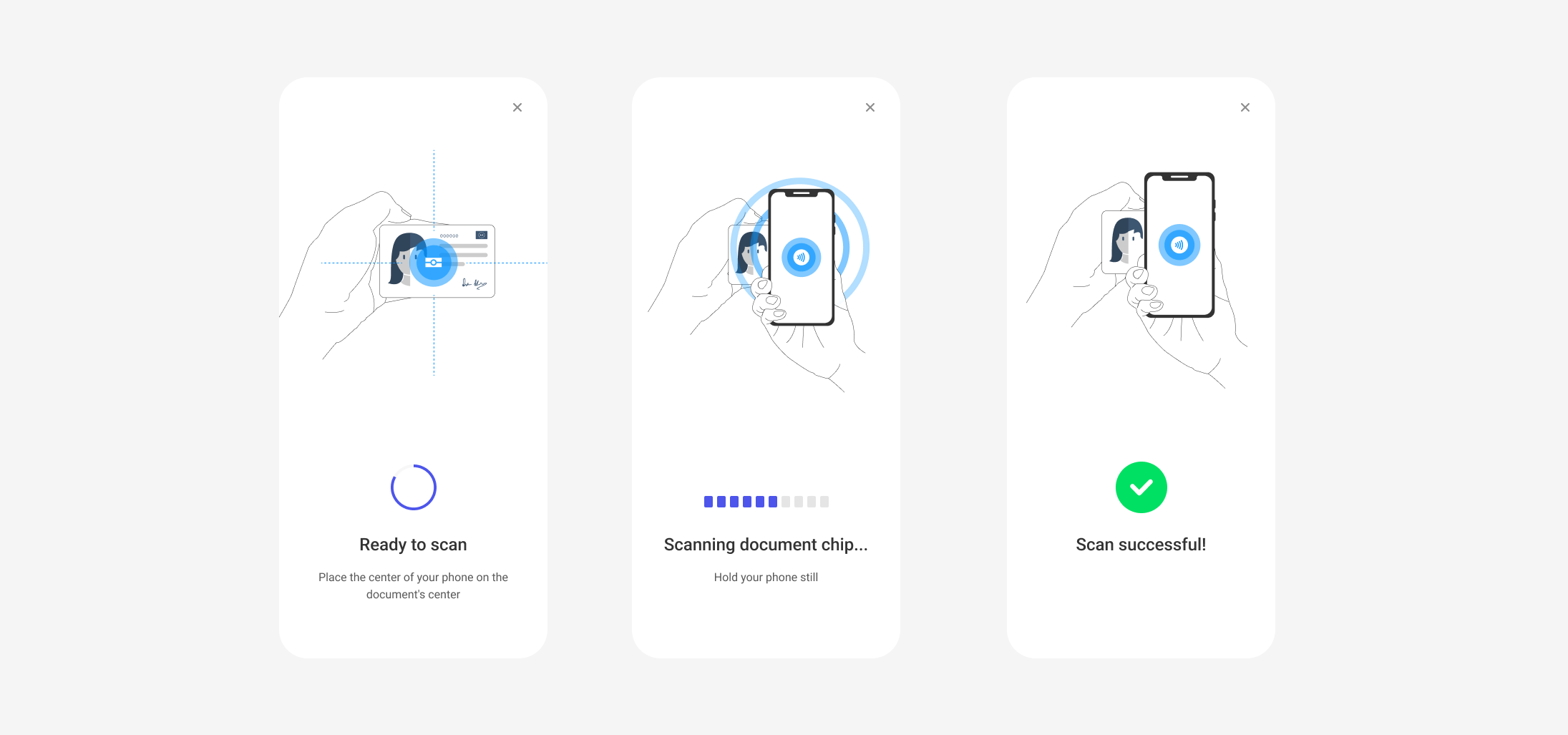
- We improved the Document NFC scanning flow for better accessibility. The updated flow makes the experience easier to follow and gives users more control. It also supports keyboard navigation, meeting WCAG 2.2.2 (Level A/AA).
- We increased the tappable area for checkboxes. Checkboxes now have a minimum tappable area of 24px, making them easier to select, especially for users on touch devices or with limited dexterity.
- We improved real-time feedback in Document and Selfie Liveness. Both flows now offer clearer guidance and dynamic prompts, making the experience easier to follow and reducing confusion. These updates support multiple WCAG 2.1 Level A and AA criteria.
Web SDK
Accessibility improvements: We continuously improve the accessibility of our Web SDKs to comply with EAA> requirements, aligning with WCAG 2.1 Level A and AA criteria.
These improvements are designed to support users with vision, dexterity, or mobility challenge, such as improved keyboard access and larger tappable areas, and include:
- We set the accessibility language for our SDK pages. We updated our SDK to define the page language, helping browsers and assistive technologies, such as screen readers, understand and pronounce content correctly. This improves accessibility, especially for users relying on screen readers or translation tools.
- We added semantic HTML for better accessibility. We now use semantic HTML for headings, labels, and text to improve structure and meaning for assistive technologies. This enhances navigation and comprehension, in line with WCAG guidelines.
- We added support for dynamic font sizing. To meet WCAG 1.4.4 (Resize Text), we now support text scaling up to 200% without loss of content or functionality in scrollable container.
- We added support for adjustable text spacing. Users can now modify paragraph spacing to improve readability, meeting WCAG 2.1 Level AA, criterion 1.4.12.
- We improved dialog accessibility and input validation. Dialogs now use semantic HTML with proper roles, headings, and announcement order for better screen reader support. We also prevent unwanted characters in input fields to reduce typing errors. These changes support WCAG 2.1 criteria 1.3.1, 2.4.3, 4.1.2, and 3.3.1 - 3.3.4.
- We increased the tappable area for checkboxes. Checkboxes now have a minimum tappable area of 24px, making them easier to select, especially for users on touch devices or with limited dexterity.
April 2025
Mobile SDK
Accessibility improvements: We continuously improve the accessibility of our Android and cross-platform plugin SDKs to comply with EAA> requirements, aligning with WCAG 2.1 Level A and AA criteria.
These recent updates enhance usability for users with vision impairments and include:
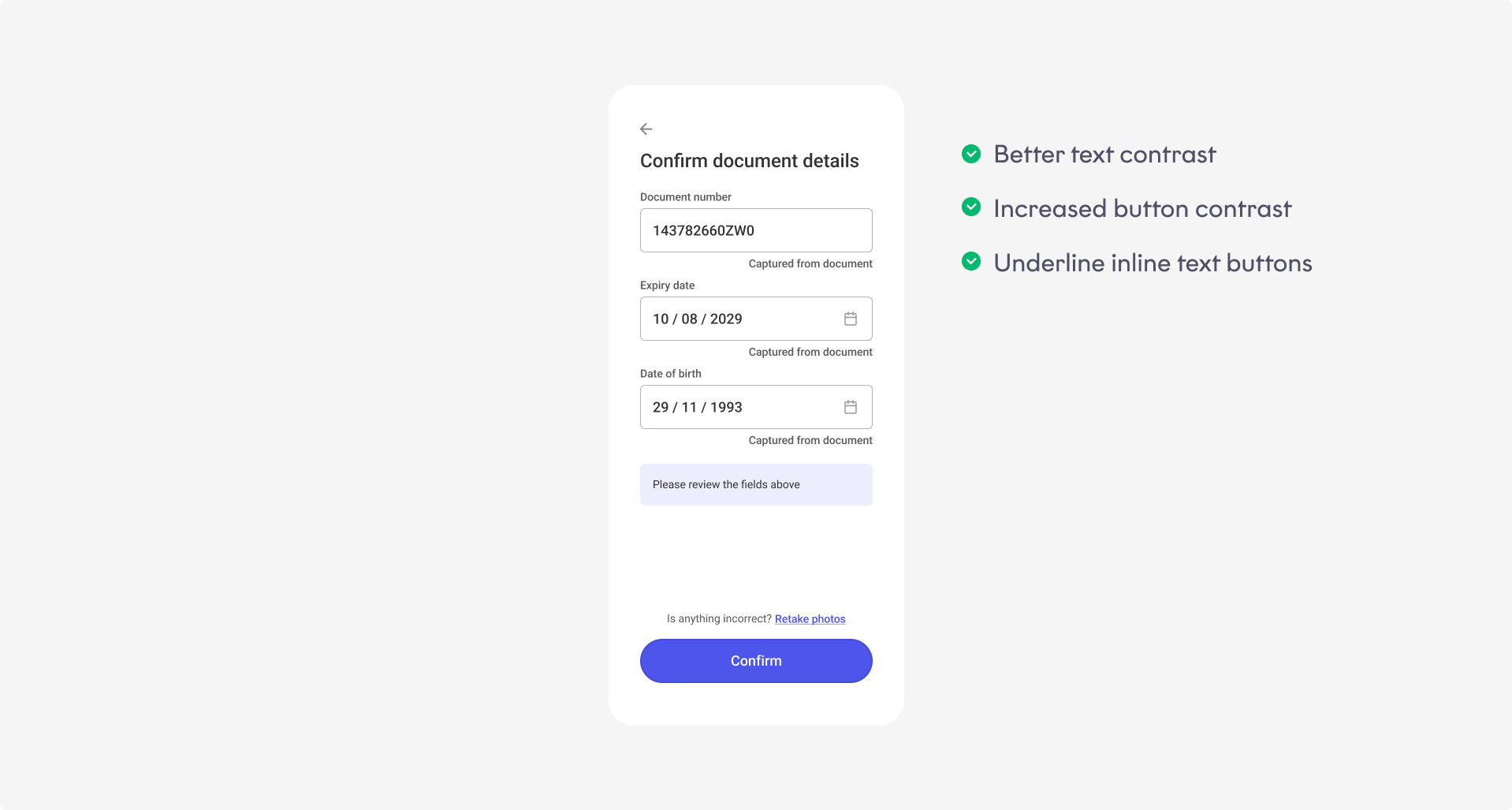
- We updated all links to include underlines, ensuring color isn’t the only way information or actions are conveyed.
- We added underlines to link buttons to ensure they’re easily identifiable, even without color cues.
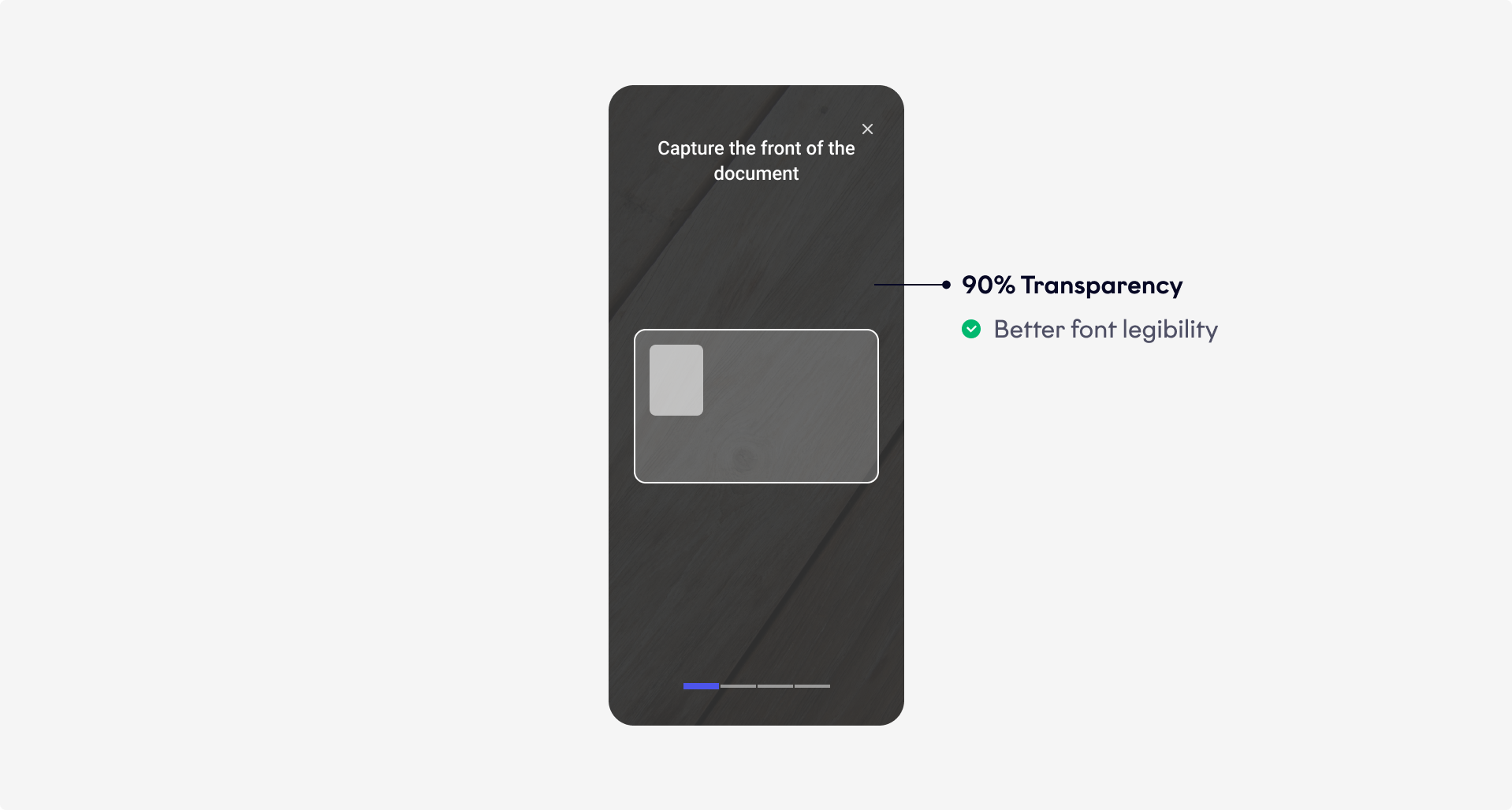
- We raised the background opacity from 50% to 90% to improve visual clarity and focus during document capture.
- We updated our default styles to increase text and UI contrast, making content easier to read and more accessible.
- We updated the default Orca color scheme to increase contrast and improve visibility.
Improved TIN extraction: We streamlined TIN extraction from Italian identity documents, improving accuracy and efficiency while reducing manual input.
Web SDK
Accessibility improvements: We continuously improve the accessibility of our Web SDKs to comply with EAA> requirements, aligning with WCAG 2.1 Level A and AA criteria.
These recent updates enhance usability for users with vision impairments and include:
- We updated all links to include underlines, ensuring color isn’t the only way information or actions are conveyed.
- We raised the background opacity from 50% to 90% to improve visual clarity and focus during document capture.
- We updated our default styles to increase text and UI contrast, making content easier to read and more accessible.
- We made the shutter and close scanner buttons fully accessible via keyboard and screen readers. This update supports users who rely on assistive technologies like screen readers or have limited motor function, improving overall accessibility of our SDKs.
ImprovedTIN> extraction: We streamlined TIN extraction from Italian identity documents, improving accuracy and efficiency while reducing manual input.
March 2025
Web SDK
Improved document upload: We’ve enhanced the document upload experience in our Documents flows by reducing upload times.
This improvement shortens user journeys and decreases waiting times, resulting in a smoother overall onboarding experience.

Document NFC
Enhanced NFC flow: We’ve optimized the Document NFC flow for Spanish identity documents by leveraging data directly from the NFC chip when a scan is performed. As a result:
- The place of birth step is automatically skipped
- Tilted document images are automatically removed
- The overall flow is shorter and more efficient
These enhancements improve completion rates for Spanish flows.
Bank Account Verification
Migration to Tink: We’re transitioning from Klarna to Tink as our PSP> to deliver improved performance, broader coverage, and a smoother payment experience.
The migration is fully handled by Fourthline — no action is required on your end.
The Fourthline Docs have been updated to reflect this change.
Mobile SDK
CameraX integration on Android (Beta): We are migrating our Android experience to the new CameraX library.
Expected benefits include:
- Higher-quality image and video capture
- Improved performance and smoother flows across our Documents and Biometrics solutions
June 2024
App Drop-in & Web SDK
Improved
Fourthline is dedicated to data-oriented decision-making, so we implemented a new analytics tracking tool: Snowplow SDK, v6.0.3.
We have also renewed our entire data pipeline.\
Stay tuned!
Added
We added videos to illustrate the user experience of our solutions and modules via the App Drop-in and Web SDK.
App Drop-in
Improved
Qualified Electronic Signature
If the client leaves the signature flow, they can now re-enter the flow at the same place, instead of having to start a new flow.
Physical Proof of Address
The copy in this module now provides better guidance and improves the user experience.
Fixed
In the Android SDK, we fixed a navigation crash when initializing the drop-in, after building with AGP 8.4.x.
Web SDK
Improved
We released improvements to selfie capturing, which has increased selfie conversion by almost 7% for Android and low-end devices!!
AML Screening & Monitoring
Improved
We have improved our webhook notifications:
- You can update your configuration to be notified when a screening requires investigation: Status
manualreviewrequired
(This was already the case for AML Monitoring.) - Notifications now include hits that are still awaiting investigation: Status
pendingManualReview - Notifications also return any relevant categories and subcategories.\
Case Review Portal
Added
Quality Assurance
We're proud to introduce a new Quality Assurance functionality that lets your Compliance and QA teams flag process improvements and demonstrate evidence of compliance reviews to regulators and auditors.
Users with the QaAuditor role can create samples of completed cases for review, specifying the sample size and time period. Within cases, auditors can add comments on individual checks. Multiple auditors can collaborate on the same sample and track progress.
Selfie video depth camera data
For the App Drop-in iOS SDK, we now collect depth camera data while recording the selfie video to help confirm liveness. This functionality uses Apple TrueDepth technology on every model later than iPhone X 2017, including iPhone 11 and higher, but excluding iPhones SE 2020 and SE 5G 2022.
Improved
Physical Proof of Address
In addition to performing eligibility checks and including the Physical Proof of Address document photo in the CDD zipfile, we now extract the following data from the document:
- Document type
- Issue date
- Validity in days, based on the document type
- Client's name
- Client's home address
We return this data in the CDD PDF, XML, and JSON formats.
Tax Number
For the Tax Number module, you can now configure which TIN> documents to accept. If a client provides a document that is outside your regulatory scope, we don't return the TIN to you.

For older notes, see the Release Notes Archive.
May 2024
App Components
Added
Introducing Fourthline App Components! If you build custom flows with your own UI, business logic, orchestration, reduce development time and effort with these standalone functionality modules for Android and iOS mobile apps.
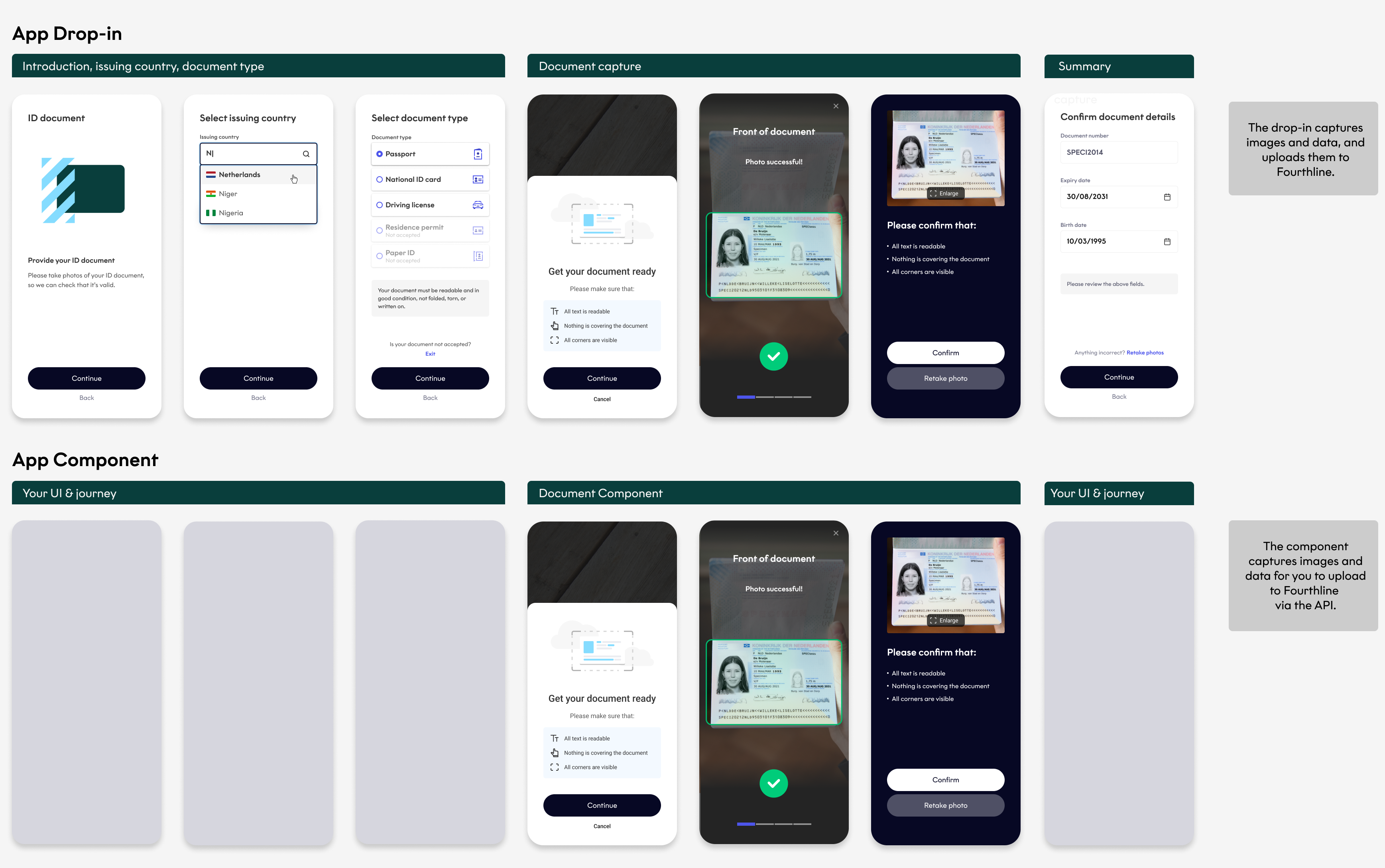
Document component
This component captures the document photos and video, with real-time feedback to the client, and extracts the data. It returns the photos, video, and data to you to upload to Fourthline via the API. We provide the UI, which you can customize in the same way as the App Drop-in. You can dynamically adjust the functionality, e.g. disable the tilted photo step.
Biometrics component
This component captures the selfie photo and video, and functions the same way as the Document component.

App Drop-in
Improved
You can now:
- Dynamically configure the minimum required age and related checks in the Identity Verification flow.
- Co-design Fourthline xcframeworks.
Web SDK
Added
European markets have different rules for the Tax Number module: some require evidence, such as a photo of a second document, and some have different forms of TIN>, such as the Spanish NIE, NIF, and DNI. Fourthline has extensive knowledge of local regulations and our SDKs offer custom flows per market.
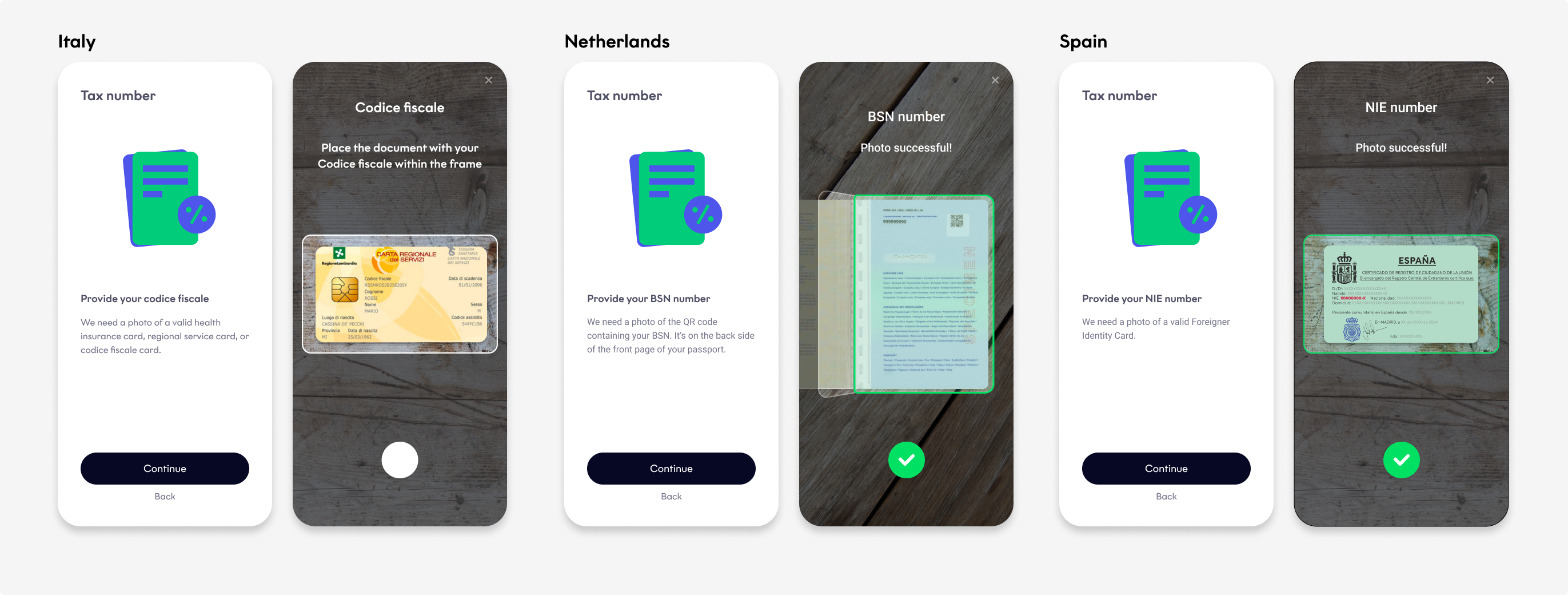
Previously, the Web SDK only supported the Dutch BSN flow. It now supports all Spanish TINs and the Italian codice fiscale, in parity with the App Drop-in.
Fixed
We fixed an issue where signed documents for Qualified Electronic Signature weren't available to download on some devices.
April 2024
App Drop-in
Added
As of May 1, 2024, Apple applies new third-party library requirements for all application owners on the App Store. For more information, see Apple Developer – Upcoming third-party SDK requirements.
Although Fourthline's iOS SDK itself isn't impacted, it uses 2 impacted libraries: Lottie and OpenSSL. Therefore we added a manifest file to the SDK, that explains which data points are used for what reason.
Fixed
We fixed:
- Some issues related to extending the validity of French national ID cards
- The Unknown selfie error, which was mostly occurring on iPhone 12 mini devices
Web SDK
Improved
Permissions dialog
We improved conversion in the Location section of the Identity Verification flow. To access the client's device geolocation, they need to give both operating system (OS) and browser permissions, which are under the OS's jurisdiction. If the client initially blocks permission and then decides to unblock it (especially on iOS), they need to change the permission settings on their device. At this point, there was an increase in drop-outs.
-
Before: On the Location access blocked screen, the client tapped the Learn more call-to-action (CTA) button, and an overlay containing the unblocking instructions opened. The client tapped
Xto close the overlay, changed the settings, and then tapped the Try again CTA button. -
Now: On the Location access blocked screen, the unblocking instructions are displayed in an accordion, providing a clear overview of the 2 steps involved. The client changes the settings and then taps the Try again CTA button.
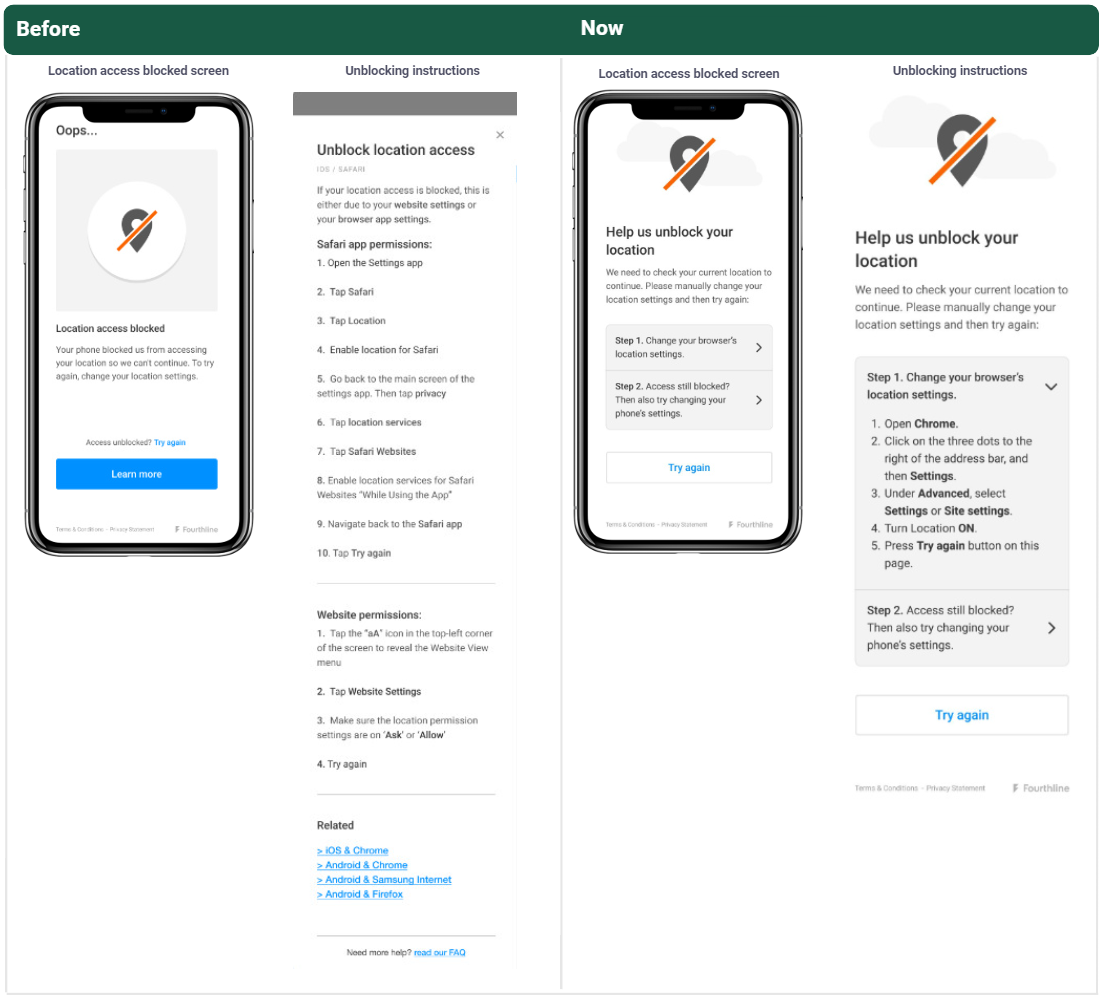
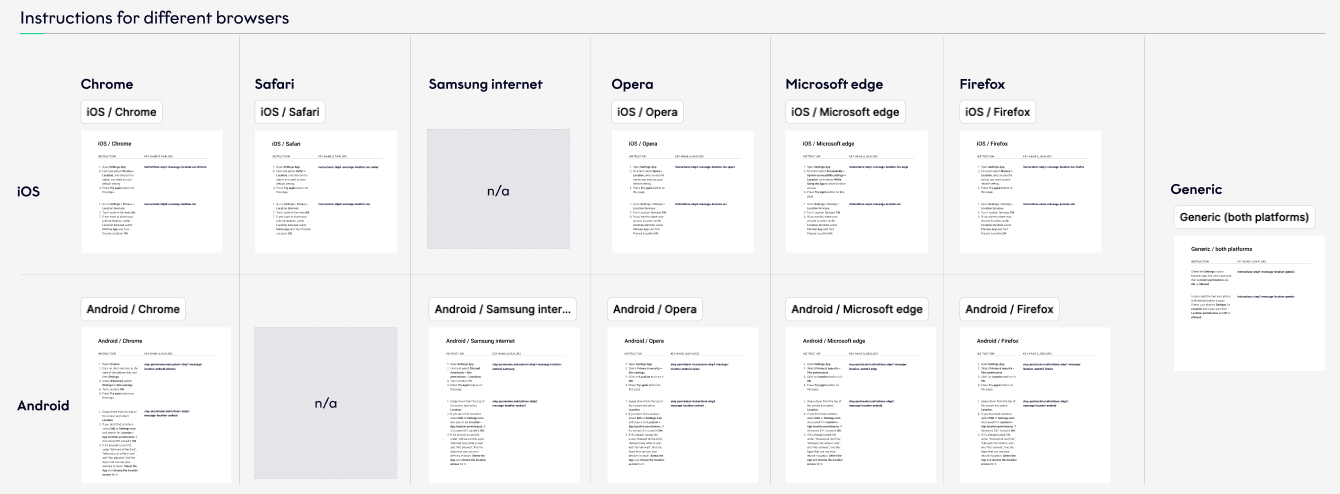
Furthermore, the unblocking instructions for both the device's geolocation and camera are now contextual and match the client's OS and browser.
Qualified Electronic Signature flow
We improved the 409: Incorrect passcode error message.\
Fixed
We fixed some errors in the German copy.
AML Screening & Monitoring
- We released new Get hits endpoints that provide more information about false positives and confirmed hits.
- You can now configure to screen clients by PEP>, sanctions, adverse media, and convictions hits separately or a custom combination, instead of all together.
- We overhauled the backend to improve search accuracy, stability, and speed.
March 2024
App Drop-in
Improved
Document NFC for Spanish documents
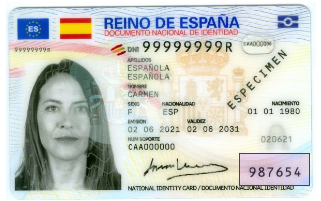
Document NFC is one of the most secure features of Fourthline's Document flow. For Spanish documents, we can now more easily unlock NFC chip>s using the card access number (CAN).
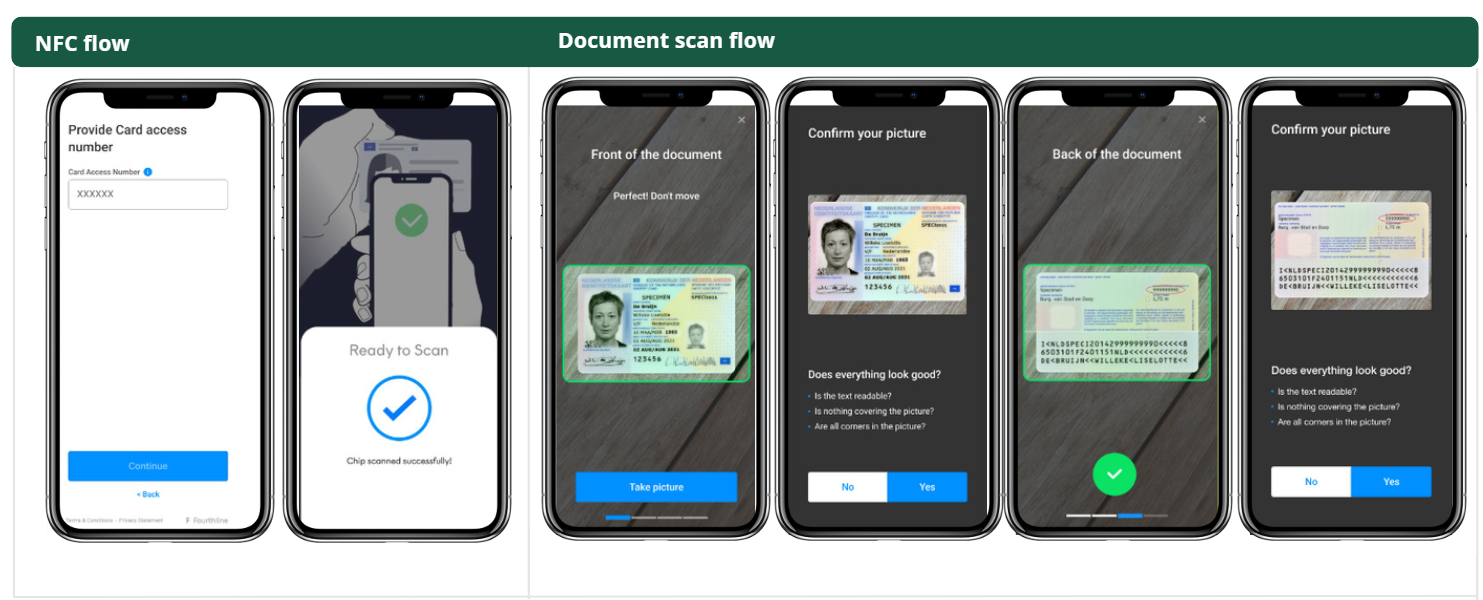
We then re-ordered the steps in the user journey, so that clients can choose:
- NFC flow: Scan the front and back of the card with NFC (42% shorter journey).
- Document scan flow: Take more document photos (front, front tilted, back, back tilted).
Click to magnify
Web SDK
Added
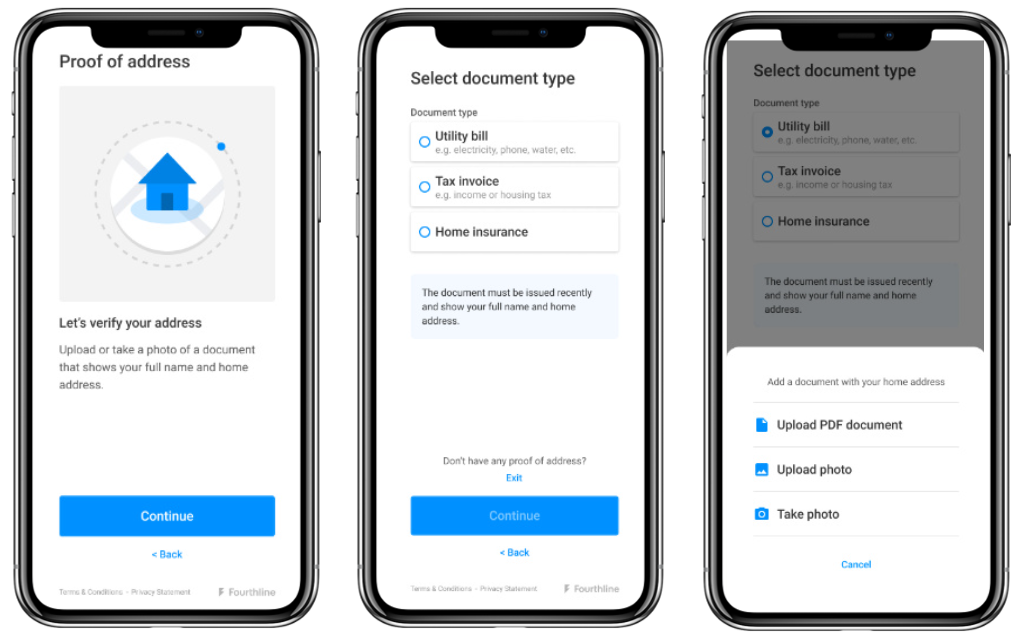
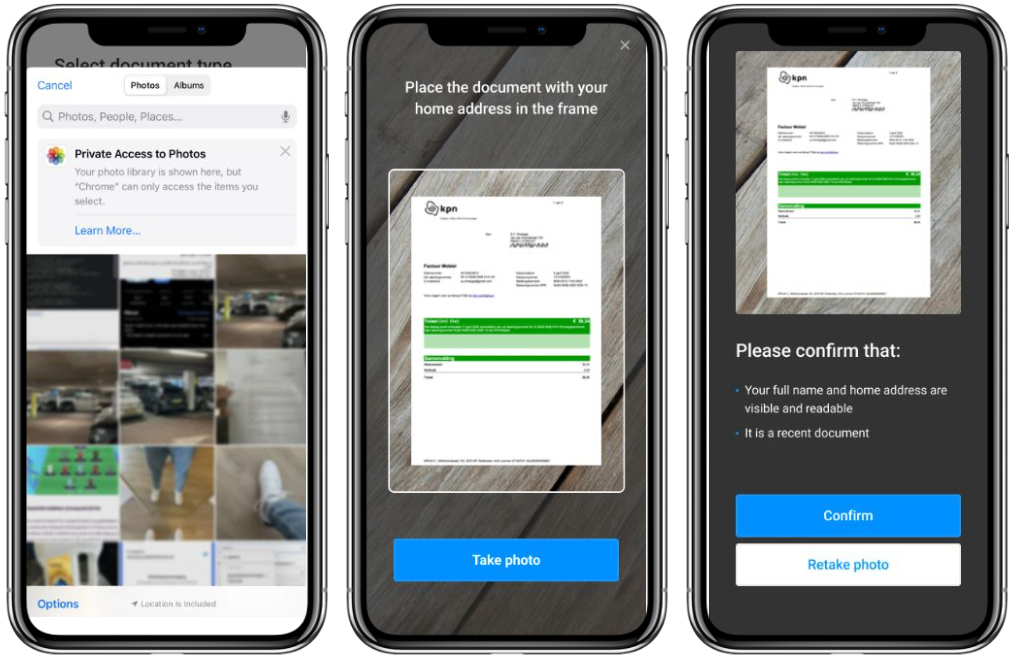
Physical Proof of Address
Physical Proof of Address is now available on Web SDK!
In this flow, the client:
- Enters the Physical Proof of Address module
- Selects the type of proof of address document
- Chooses to upload a PDF file or photo of the document from their device, or to take a photo of the document now
- Either selects a file or image to upload
- Or, takes a photo of the document
- Confirms the document photo
Enable JS prompt
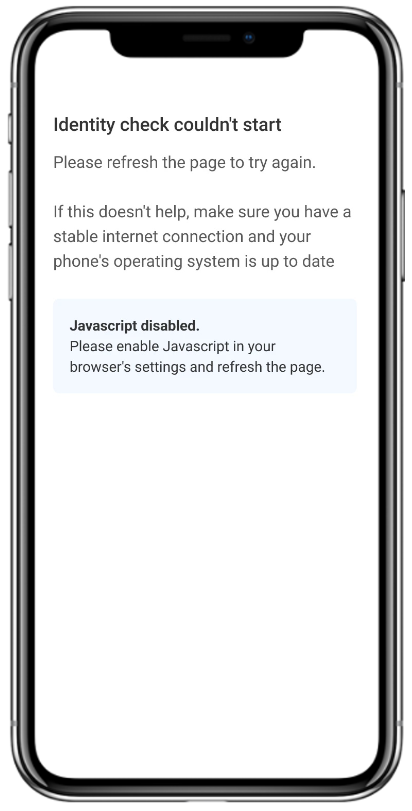
Previously, if the client had JavaScript disabled in their mobile web browser, the Web SDK couldn't load.
Now, the SDK detects this and the UI prompts the client to enable JavaScript to start the workflow.
Improved
Feature configuration
You can now configure to enable or disable the following features:
- Selfie video
- Tax Number extraction
- Tilted document photos
Lower minimum age
Previously, the minimum supported age was 18 years and is now 16 years.
Case Review Portal
You can now set up access to the Case Review Portal via Okta Federation.