
Document Component
App Components
Use the Document Component to capture the client's identity document photos and video, based on your workflow tenant configuration (tilted capture, document video, supported countries, real-time feedback).
If AI services are enabled for your tenant, the component can show an additional screen where further document validations run before the client continues.
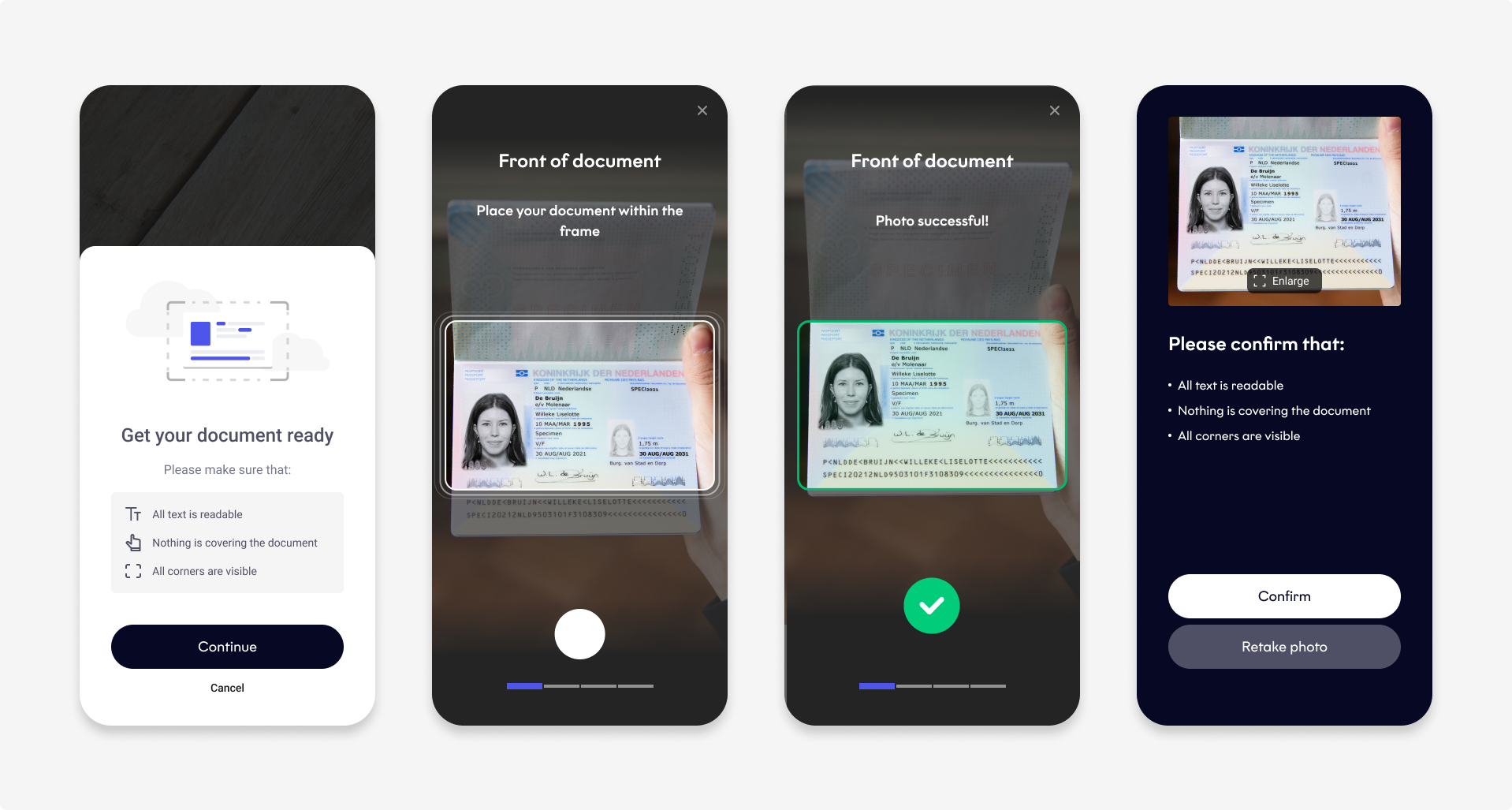
Document Component
Issuing country
The issuing country is required for the client's primary identity document. It is not required for Physical Proof of Address or tax documents.
| Scenario | SDK behavior | Example failure |
|---|---|---|
The documentType and issuingCountry combination is not supported by your tenant configuration. | Returns a failure before showing any UI. No bottom sheet appears. | idv.document_type_not_supported or idv.issuing_country_not_supported |
| The configuration is valid, but the scanned document does not match the expected document type or is not supported. | Shows a bottom sheet and completes with a failure. | idv.document_type_mismatch |
When you use the Document Component standalone, pass only supported documentType and issuingCountry values. Otherwise, the component can close with a failure before the client can interact with it.
Document types
The Document Component supports the following document types:
| Document type | Description |
|---|---|
driversLicense | Driving license |
dutchDriversLicense | Dutch driving license |
frenchIdCard | French ID card |
idCard | ID card |
paperId | Paper ID |
passport | Passport |
proofOfAddress | Proof of Address |
residencePermit | Residence permit |
tinReferenceDocument | TIN document |
Before you begin
- Start a workflow session (
Orca.workflowSession), then calldocumentComponentwithDocumentComponentConfig. - Before showing the SDK UI, the component validates the configuration and workflow status. If validation fails,
onProductCompletedis called with a failure, andonPresentationStarted is not called.
Success handling
If the workflow completes successfully, the component returns:
- A document payload containing the document photos, document video, and data extracted from the MRZ. The payload is returned as
documenton Android anddocumentResulton iOS. - An optional
documentAnalysisobject containing data extracted from the document photos.
data class DocumentComponentResult(
    val document: WorkflowResults.Component.Document,
    val documentAnalysis: WorkflowResults.Component.DocumentAnalysis? = null,
)
struct DocumentComponentResult {
let documentResult: WorkflowResults.Component.Document
let documentAnalysis: WorkflowResults.Component.DocumentAnalysis?
}{
"documentResult":{
"documentType":"String",
"images":[
{
"image":"String",
"isAngled":"Boolean",
"timestamp":"String",
"fileSide":"String",
"location":{
"latitude":"String",
"longitude":"Number"
}
}
],
"mrtdMrzInfo":{
"rawMrz":"String",
"documentCode":"String",
"issuingCountry":"String",
"documentNumber":"String",
"expirationDate":"String",
"firstNames":[
"String"
],
"lastNames":[
"String"
],
"birthDate":"String",
"nationality":"String",
"gender":"String",
"validationErrors":[
"ValidationError"
]
},
"idlMrzInfo":{
"rawMrz":"String",
"documentNumber":"String",
"validationErrors":[
"ValidationError"
]
},
"videoRecording":{
"url":"String",
"duration":"String",
"location":{
"latitude":"String",
"longitude":"Number"
}
}
},
"documentAnalysis":{
"firstName":"String",
"lastName":"String",
"initials":"String",
"gender":"String",
"nationality":"String",
"issuingCountry":"String",
"issueDate":"String",
"expirationDate":"String",
"dateOfBirth":"String",
"birthPlace":"String",
"documentNumber":"String",
"documentType":"String",
"taxIdentificationNumber":"String"
}
}Plugins documentResult attributes
All attributes are optional.
| Attribute | Description | |
|---|---|---|
documentType String | The identity document type. | |
images Array of objects | Information about each document photo. | |
images.image String | The absolute filepath to the document photo. | |
images.isAngled Boolean | •True: The photo is tilted. • False: The photo is flat. | |
images.timestamp String | The timestamp for when the document photo was captured. | |
images.fileSide String | The side of the identity document. | |
images.location Object | The coordinates of the document photo. | |
images.location.latitude String | The latitude of the document photo. Format: Float between -90 and 90 Example: 45.464664 | |
images.location.longitude String | The longitude of the document photo. Format: Float between -90 and 90 Example: 45.464664 | |
mrtdMrzInfo Object | The data extracted from the MRZ of a frenchIdCard, idCard, passport, or residencePermit. | |
mrtdMrzInfo.rawMrz String | The raw data from the MRZ. | |
mrtdMrzInfo.documentCode String | [Is this document type?] | |
mrtdMrzInfo.issuingCountry String | The country that issued the identity document. | |
mrtdMrzInfo.documentNumber String | The identity document number. | |
mrtdMrzInfo.expirationDate String | The identity document expiry date. Format: Date YYYY-MM-DD | |
mrtdMrzInfo.firstNames Array of strings | The client's first name(s). Format: Alphabetical characters, spaces, hyphens, and apostrophes | |
mrtdMrzInfo.lastNames Array of strings | The client's last name(s). Format: Alphabetical characters, spaces, hyphens, and apostrophes | |
mrtdMrzInfo.birthDate String | The client's date of birth. Format: Date YYYY-MM-DD | |
mrtdMrzInfo.nationality String | The client's nationality. Format: ISO 3166-1 alpha-3 country code | |
mrtdMrzInfo.gender String | The client's sex. • Female • Male • Other: identity document contains a value other than Female or Male • Unknown: identity document contains no gender field | |
mrtdMrzInfo.validationErrors Array of strings [Or integers?] | The validation error code(s). | |
idlMrzInfo Object | The data extracted from the MRZ of a Dutch driving license. | |
idlMrzInfo.rawMrz String | The raw data from the MRZ. | |
idlMrzInfo.documentNumber String | The identity document number. | |
idlMrzInfo.validationErrors Array of strings | The validation error code(s). | |
videoRecording Object | Information about the document video. | |
videoRecording.url String | The absolute url filepath to the document video. | |
videoRecording.duration String | The length of the document video. [What unit of time? Seconds?] | |
videoRecording.location Object | The coordinates of the document video. | |
videoRecording.location.latitude String | The latitude of the document video. Format: Float between -90 and 90 Example: 45.464664 | |
videoRecording.location.longitude String | The longitude of the document video. Format: Float between -90 and 90 Example: 45.464664 |
Plugins documentAnalysis attributes
All attributes are optional.
| Attribute | Description |
|---|---|
firstName String | The client's first name. Format: Alphabetical characters, spaces, hyphens, and apostrophes |
lastName String | The client's last name. Format: Alphabetical characters, spaces, hyphens, and apostrophes |
initials String | The client's initials. Format: Alphabetical characters, spaces, hyphens, and apostrophes |
gender String | The client's sex. • Female • Male • Other: identity document contains a value other than Female or Male • Unknown: identity document contains no gender field |
nationality String | The client's nationality. Format: ISO 3166-1 alpha-3 country code |
issuingCountry String | The country that issued the identity document. |
issueDate String | The date the identity document was issued. Format: Date YYYY-MM-DD |
expirationDate String | The date the identity document expires. Format: Date YYYY-MM-DD |
dateOfBirth String | The client's date of birth. Format: Date YYYY-MM-DD |
birthPlace String | The city where the client was born. |
documentNumber String | The identity document number. |
documentType String | The identity document type. |
taxIdentificationNumber String | The client's TIN. |
On Android, when your tenant enables in-memory recording (cameraX.inMemoryRecording.enabled, API 30+), videoRecording.url in the plugin JSON may be memory://fourthline/video. The MP4 bytes are available on videoRecording.data in the native SDK model. This does not apply on iOS.
Presentation callbacks
present exposes two callbacks:
| Callback | When it is called |
|---|---|
onPresentationStarted | Preparation succeeded and the SDK is about to show UI. Hide any host loading indicator here. Not called when preparation fails. |
onProductCompleted | The component finishes once (success, user cancel, or failure). Always handle the result here, and hide the loading indicator if it is still visible. |
If your app shows a loading indicator before calling present, hide it in onPresentationStarted. If preparation fails, hide it in onProductCompleted instead.
Error handling
The Document Component returns WorkflowFailure when document capture or validation fails.
Document-specific failure codes use the idv.* prefix. Shared failure codes, such as session.*, transport.*, and user.canceled, also apply to NFC, Biometrics, and QES.
Recovery actions
Use recovery to determine the next action and code to handle specific outcomes, such as user.canceled or document validation failures.
For available recovery actions, see Configuration → Error handling → WorkflowFailure.
Failure codes (idv.*)
idv.*)| Code | Description |
|---|---|
idv.pending_verification | Identity verification is waiting to be processed. |
idv.status_invalid | The IDV workflow status does not allow the component to start. |
idv.person_not_adult | The person is under the minimum required age. |
idv.nationality_not_supported | The nationality is not supported. |
idv.issuing_country_not_supported | The document issuing country is not supported. |
idv.issuing_country_mismatch | The scanned issuing country does not match the selected country. |
idv.document_expired | The document has expired. |
idv.document_type_not_supported | The document type is not supported. |
idv.document_type_invalid | The scanned document MRZ type does not match the selected type. |
idv.document_type_mismatch | The scanned document type does not match the selected type. |
idv.document_side_mismatch | The scanned document side does not match the expected side. |
idv.no_document_detected | No document was detected. |
idv.missing_country_and_type | The document type or issuing country could not be detected. |
idv.undefined_document_type | The document type is undefined. |
idv.unexpected | An unexpected identity verification error occurred. |
Testing
Start a TestMe session using any mock validation code:
import com.fourthline.networking.NetworkEnvironment
import com.fourthline.orca.Orca
import com.fourthline.orca.workflow.WorkflowConfig
import com.fourthline.orca.workflow.WorkflowFailure
import com.fourthline.orca.workflow.WorkflowSession
import com.fourthline.orca.workflow.workflowSession

fun startSession(context: Context) {
  val config = WorkflowConfig(networkEnvironment = NetworkEnvironment.Mock)

  Orca
    .workflowSession(
      context = context,
      validationCode = "IDV",
    )
    .configure(config)
    .start { result ->
      result.fold(
        onSuccess = { session ->
          launchDocumentComponent(context, session)
        },
        onFailure = { workflowError ->
          print("Handle error... $workflowError")
        }
      )
    }

}

fun launchDocumentComponent(context: Context, session: WorkflowSession) {
  val flavor = OrcaFlavor()
  val documentConfig = DocumentComponentConfig(
    type = documentType, /// See the `DocumentType` table.
    issuingCountry = issuingCountry /// Format: ISO3 country code
  )

  session
    .documentComponent(context, documentConfig)
    .customize(DocumentCustomizationConfig(flavor))
    .present(
      onPresentationStarted = {
        // Hide the host loading indicator; the SDK UI is about to be shown
      },
      onProductCompleted = { result ->
        result.fold(
          onSuccess = { documentResult ->
            print("Document component completed.")
          },
          onFailure = { throwable ->
            val failure = throwable as? WorkflowFailure
            print("Handle error... ${failure?.code?.identifier} ${failure?.recovery}")
          },
        )
      },
    )
}
import FourthlineSDK
override func viewDidLoad() {
super.viewDidLoad()
let customization = WorkflowConfig(
networkEnvironment: .mock
)
Orca
.workflowSession(validationCode: "IDV")
.configure(with: customization)
.start { [weak self] result in
switch result {
case let .success(session):
launchDocumentComponent(session)
case let .failure(workflowError):
print("Handle error...\(workflowError)")
}
}
}
func launchDocumentComponent(_ session: WorkflowSession) {
session
.documentComponent(with:
DocumentComponentConfig(
type: documentType, /// See the `DocumentType` table.
issuingCountry: issuingCountry /// Format: ISO3 country code
)
)
.customize(with: DocumentCustomizationConfig(flavor: orcaFlavor))
.present(
onPresentationStarted: {
// Hide the host loading indicator; the SDK UI is about to be shown
},
onProductCompleted: { result in
switch result {
case let .success(documentResult):
print("Document component completed.")
case let .failure(failure):
print("Handle error...\(failure.code.rawValue) \(failure.recovery)")
}
}
)
}function startWorkflowSession() {
var config = `{
"configuration": {
"validationCode": "IDV",
"networkEnvironment": "mock"
}
}`;
FourthlinePlugin.startWorkflowSession(
config,
function(msg) {
// The client has successfully started a workflow session.
// You can now start a workflow component.
},
function(error) {
// Extract and process information from the error.
// See Error handling.
var jsonError = JSON.parse(error.message);
}
);
}
function startWorkflowDocumentComponent() {
var config = `{
"configuration": {
"documentType": "passport",
"issuingCountry": "NLD"
},
}`;
FourthlinePlugin.startWorkflowComponentDocument(
config,
function(msg) {
// Use the componentResult to continue the user experience on your side.
},
function(error) {
// Extract and process information from the error.
// See Error handling.
var jsonError = JSON.parse(error.message);
}
);
}
final _fourthlinePlugin = Fourthline();

startWorkflowSession() async {
  String config = """
    {
      "configuration": {
        "validationCode": "IDV",
        "networkEnvironment": "mock"
      }
    }
    """;

  try {
    String sessionResult = await _fourthlinePlugin.startWorkflowSession(config) ?? "Could not start Workflow Session";
    // The client has successfully started a workflow session.
    // You can now start a workflow component.
    startWorkflowComponent();
  } on PlatformException catch (e) {
    // Extract and process information from the error.
    // See Error handling.
  };
}

startWorkflowComponent() async {
  String config = """
    {
      "configuration": {
        "documentType": "passport",
        "issuingCountry": "NLD"
      },
    }
    """;

  try {
    String componentResult = await _fourthlinePlugin.startWorkflowComponentDocument(config) ?? "Could not start Workflow Document Component";
    // Use the componentResult to continue the user experience on your side.
  } on PlatformException catch (e) {
    // Extract and process information from the error.
    // See Error handling.
  };
}
function startWorkflowSession() {
var config = `
{
"configuration": {
"validationCode": "IDV",
"networkEnvironment": "mock"
}
}
`;
NativeModules.Fourthline.startWorkflowSession(config)
.then((result) => {
// The client has successfully started a workflow session.
// You can now start a workflow component.
startWorkflowComponent();
})
.catch((error) => {
// Extract and process information from the error.
// See Error handling.
});
}
startWorkflowComponent() async {
var config = `
{
"configuration": {
"documentType": "passport",
"issuingCountry": "NLD"
},
}
`;
NativeModules.Fourthline.startWorkflowComponentDocument(config)
.then((result) => {
// Use the componentResult to continue the user experience on your side.
})
.catch((error) => {
// Extract and process information from the error.
// See Error handling.
});
}Example
The following is a complete example:
import com.fourthline.networking.NetworkEnvironment
import com.fourthline.orca.Orca
import com.fourthline.orca.core.flavor.OrcaFlavor
import com.fourthline.orca.core.flavor.OrcaFonts
import com.fourthline.orca.document.DocumentCustomizationConfig
import com.fourthline.orca.workflow.DocumentComponentConfig
import com.fourthline.orca.workflow.WorkflowConfig
import com.fourthline.orca.workflow.WorkflowFailure
import com.fourthline.orca.workflow.WorkflowSession
import com.fourthline.orca.workflow.workflowSession
import java.io.File

fun startSession(context: Context) {
    // Make a POST Create SDK session request: https://{{baseUrl}}/v1/workflows/{{workflowId}}/validationcode.
    val validationCode = "xxxxxxxx"

    // To test the workflow offline, use Mock. To test networking, use Sandbox or Production.
    val config = WorkflowConfig(networkEnvironment = NetworkEnvironment.Mock)

    Orca
      .workflowSession(
        context = context,
        validationCode = validationCode,
      )
      .configure(config)
      .start { result ->
        result.fold(
          onSuccess = { session ->
            launchDocumentComponent(context, session)
          },
          onFailure = { workflowError ->
            print("Handle error... $workflowError")
          }
        )
      }
  }

  fun launchDocumentComponent(context: Context, session: WorkflowSession) {
    val customFlavor = OrcaFlavor(
      fonts = OrcaFonts(
        screenHeader = OrcaFonts.Font.FromFontRes(fontRes = R.font.roboto_medium, size = 20),
        primaryButton = OrcaFonts.Font.FromFile(file = File(...), size = 18
      ),
    )

    val documentConfig = DocumentComponentConfig(
      type = documentType, /// See the `DocumentType` table.
      issuingCountry = issuingCountry /// Format: ISO3 country code
    )

    session
      .documentComponent(context, documentConfig)
      .customize(DocumentCustomizationConfig(customFlavor))
      .present(
        onPresentationStarted = {
          // Hide the host loading indicator; the SDK UI is about to be shown
        },
        onProductCompleted = { result ->
          result.fold(
            onSuccess = { documentResult ->
              print("Document component completed.")
            },
            onFailure = { throwable ->
              val failure = throwable as? WorkflowFailure
              print("Handle error... ${failure?.code?.identifier} ${failure?.recovery}")
            },
          )
        },
      )
  }
import FourthlineSDK
override func viewDidLoad() {
super.viewDidLoad()
let customization = WorkflowConfig(
networkEnvironment: .mock // To test the workflow offline, use .mock. To test networking, use .sandbox or .production.
)
let validationCode = "xxxxxxxx" // Make a POST Create SDK session request: https://{{baseUrl}}/v1/workflows/{{workflowId}}/validationcode.
Orca
.workflowSession(validationCode: validationCode)
.configure(with: customization)
.start { [weak self] result in
switch result {
case let .success(session):
launchDocumentComponent(session)
case let .failure(workflowError):
print("Handle error...\(workflowError)")
}
}
}
func launchDocumentComponent(_ session: WorkflowSession) {
var orcaFlavor = OrcaFlavor()
// Configure the colors
var palette = OrcaPalette()
palette.primary = UIColor(red: 82.0 / 255.0, green: 30.0 / 255.0, blue: 135.0 / 255.0, alpha: 1)
var colors = OrcaColors(colorPalette: palette)
colors.hint.backgroundColor = UIColor(red: 221.0 / 255.0, green: 210.0 / 255.0, blue: 232.0 / 255.0, alpha: 0.5)
colors.box.borderColor = UIColor.gray
colors.screen.tableCells.cellStyle2.iconColor = UIColor(red: 221.0 / 255.0, green: 210.0 / 255.0, blue: 3.0 / 255.0, alpha: 1)
orcaFlavor.colors = colors
let documentType = .passport
let issuingCountry = "NLD"
session
.documentComponent(with:
DocumentComponentConfig(
type: documentType,
issuingCountry: issuingCountry
)
)
.customize(with: DocumentCustomizationConfig(flavor: orcaFlavor))
.present(
onPresentationStarted: {
// Hide the host loading indicator; the SDK UI is about to be shown
},
onProductCompleted: { result in
switch result {
case let .success(documentResult):
print("Document component completed.")
case let .failure(failure):
print("Handle error...\(failure.code.rawValue) \(failure.recovery)")
}
}
)
}// Call this after starting a valid WorkflowSession.
function startWorkflowDocumentComponent() {
var config = `{
"configuration": {
"documentType": "passport",
"issuingCountry": "NLD"
},
"customization": {
...
}
}`;
FourthlinePlugin.startWorkflowComponentDocument(
config,
function(msg) {
// Use the componentResult to continue the user experience on your side.
},
function(error) {
// Extract and process information from the error.
// See Error handling.
var jsonError = JSON.parse(error.message);
}
);
}
final _fourthlinePlugin = Fourthline();

// Call this after starting a valid WorkflowSession.
startWorkflowComponent() async {
  String config = """
    {
      "configuration": {
        "documentType": "passport",
        "issuingCountry": "NLD"
      },
      "customization": {
        ...
      }
    }
    """;

  try {
    String componentResult = await _fourthlinePlugin.startWorkflowComponentDocument(config) ?? "Could not start Workflow Document Component";
    // Use the componentResult to continue the user experience on your side.
  } on PlatformException catch (e) {
    // Extract and process information from the error.
    // See Error handling.
  };
}
// Call this after starting a valid WorkflowSession.
startWorkflowComponent() async {
String config = `
{
"configuration": {
"documentType": "passport",
"issuingCountry": "NLD"
},
"customization": {
"flavor": {
"colors": ${orcaColors},
"fonts": ${orcaFonts},
"localization": ${orcaLocalization},
"layouts": ${orcaLayout}
}
}
}
`;
NativeModules.Fourthline.startWorkflowComponentDocument(config)
.then((result) => {
// Use the componentResult to continue the user experience on your side.
})
.catch((error) => {
// Extract and process information from the error.
// See Error handling.
});
}Updated 44 minutes ago