
Document Photo
Product group overview
Document Photo ensure ID document submissions are fast, reliable, and accurate - automatically confirming visibility and authenticity, then extracting key data.
Primary Document
Primary documents are the main government-issued ID documents used to verify a client’s identity. These typically include:
- Passports
- National ID cards
- Residence permits
- Driving licenses
The client provides photos of their primary document (at least one photo per side) and we verify that the document is fully visible and authentic and subsequently extract the document data.
When the client enters the module, they first select the issuing country of their ID document and then the document type from the list of supported ID documents for that country.
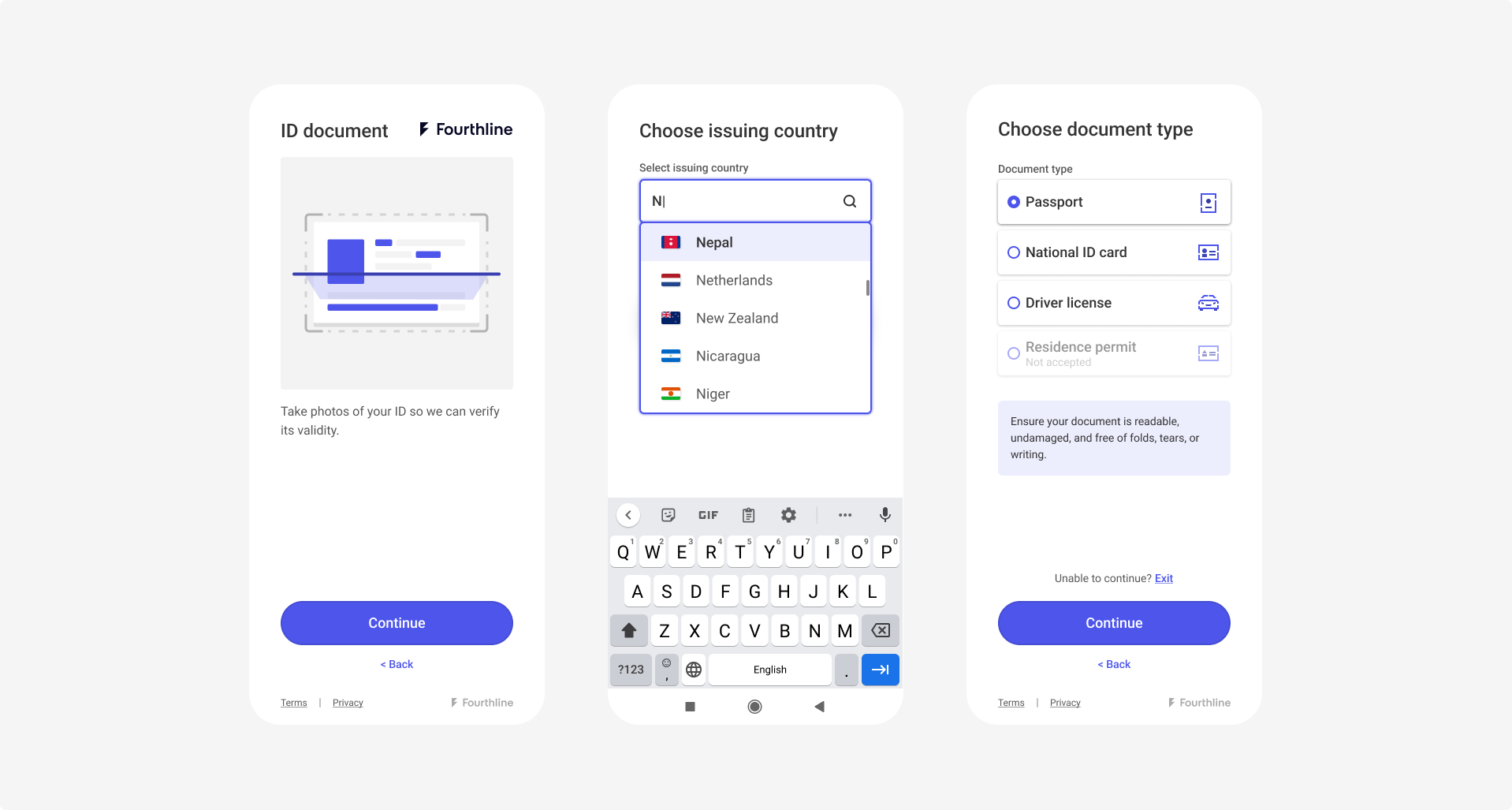
Client selects ID document issuing country and type
The client positions their ID document within the mask and the photo is either auto-captured (if supported) or the client taps the button (can vary per integration option). The client confirms the photo or tries again.
Fourthline extracts the client’s personal data from the MRZ and/or VIZ and displays the details. The client confirms the document details or tries again.
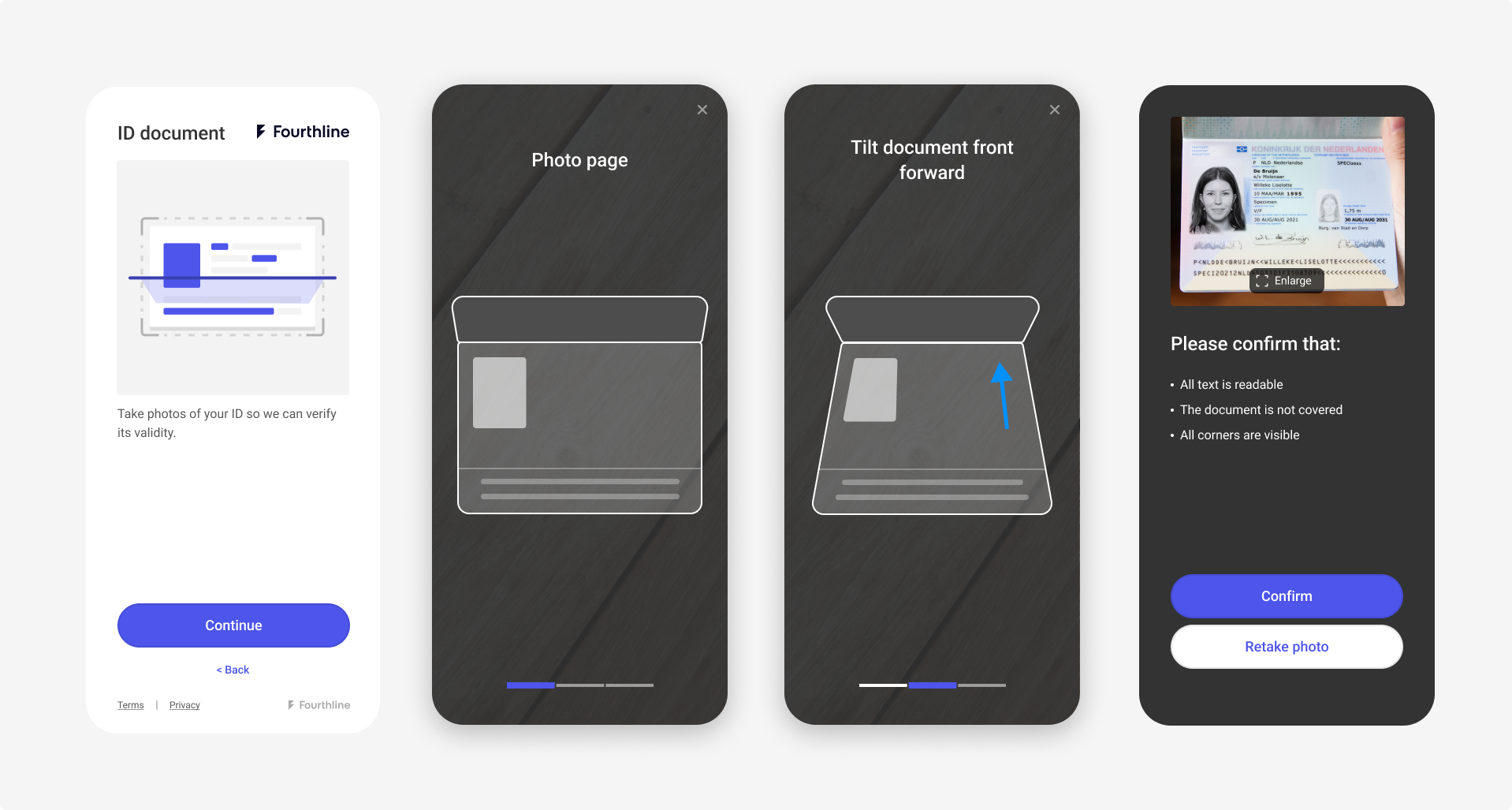
Client takes document photo
If configured, the client enters their contact details.
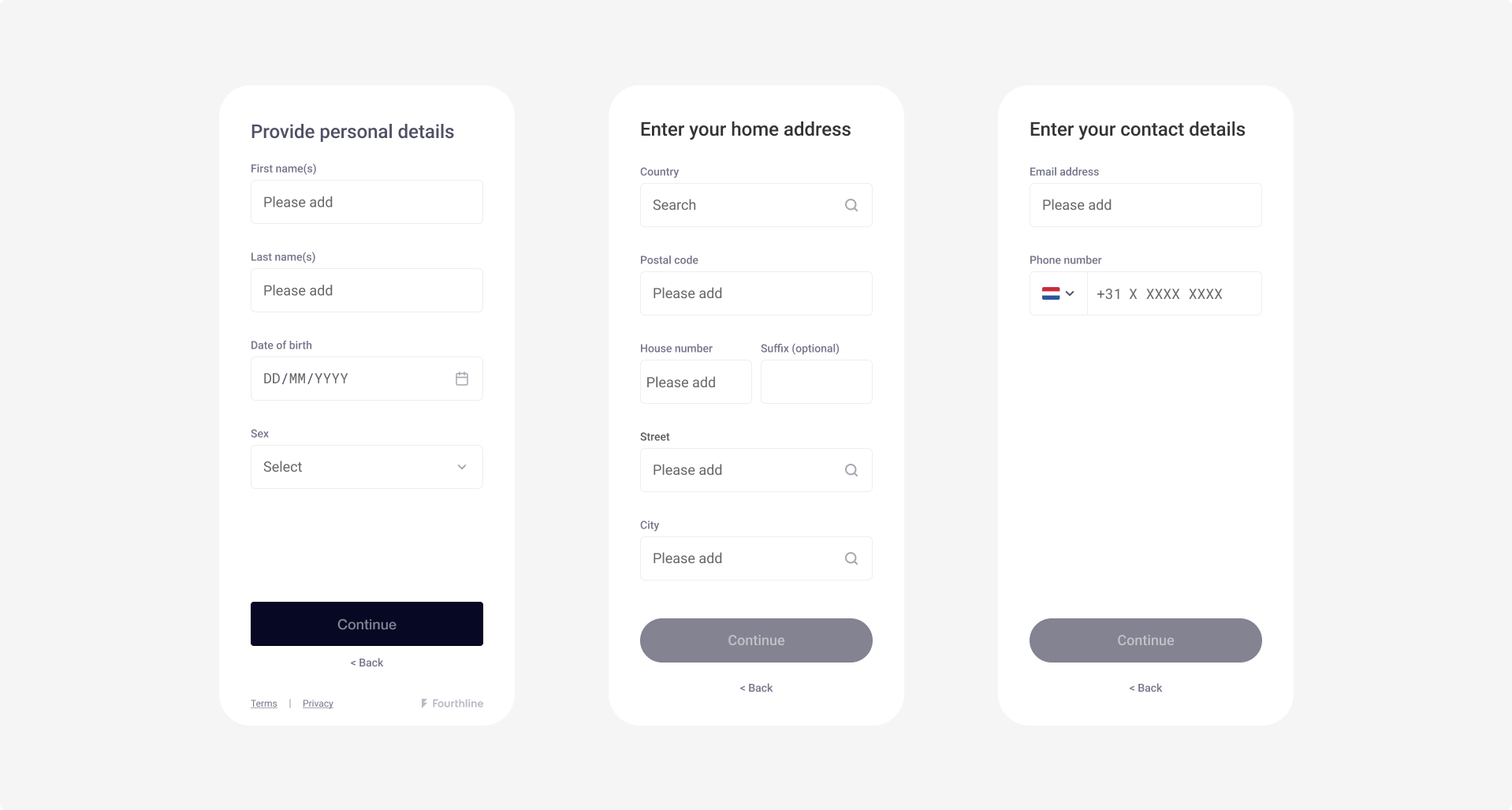
Client enters contact details
Verification checks
Fourthline performs a comprehensive suite of checks, including:
| Check | Description |
|---|---|
| Self-capture | The client took the document photos themselves during the workflow using the device camera, and they were not inserted via captures, camera roll or library sources, or by any third party. |
| Image quality | Good quality photos of all required sides of the document are provided so that we can assess it correctly. |
| Personal data | All data groups are present and correct any typos or misread data, following the International Civil Aviation Organization (ICAO) transliteration standard in Doc 9303: Machine Readable Travel Documents. |
| Validity | The ID document is currently valid. |
| Age | The client is the minimum supported age or older. |
| Supported document | You and Fourthline both support the document type and issuing country. |
| Document condition | The document is in acceptable condition. |
| Document address | If present, Fourthline can extract the client's address from the ID document as raw data. |
| Document issuing country | If the client does not specify the issuing country in the UI, Fourthline can extract it from the document. |
| Diacritics | Fourthline can recognize special characters with diacritics in the VIZ and share the raw data with you. |
| Tax Number | As an additional module, Fourthline can extract the client's TIN> from the relevant ID document as raw data. To enable this module, please contact your Fourthline delivery manager for the necessary configurations. |
Note
For the complete list of supported ID documents and all checks we perform, request our CDD Policy from your Fourthline delivery manager.
Secondary Document
If a country requires clients to provide a photo of a secondary document(e.g. when the primary ID is a paper-based document), you can include an additional module that follows the same capture flow as the primary document.
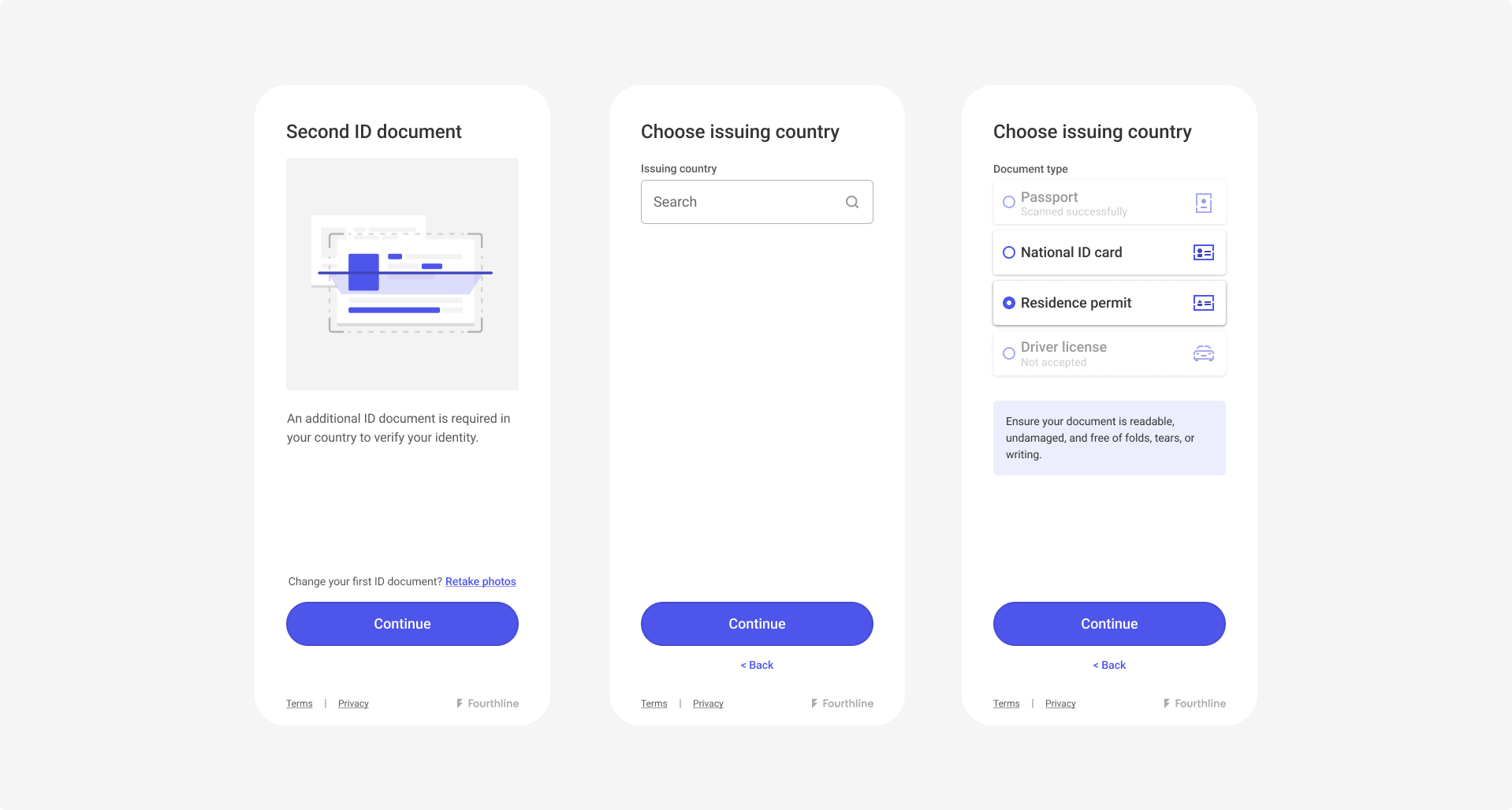
Secondary Document module
Verification checks
Fourthline performs a comprehensive suite of checks, including:
| Check | Description |
|---|---|
| Genuine photo | The photo is of the actual ID document, not a photo of a photo. |
| Image quality | The image quality of the photo is acceptable. |
| Validity | The ID document is valid and not expired. |
| Document condition | The ID document is in acceptable condition. |
| Portrait match | The person in the document portrait is the same as the primary ID document. This is verified against personal data. |
| Supported document | You and Fourthline both support the document type and issuing country. |
| Tax Number | As an additional module, Fourthline can extract the client's TIN from the relevant ID document as raw data. To enable this module, please contact your Fourthline delivery manager for the necessary configurations. |
Tax Number
To capture a client's TIN and other tax-related information, you can integrate an additional module into your workflow. This module can be configured to work alongside the primary document or secondary document capture processes.
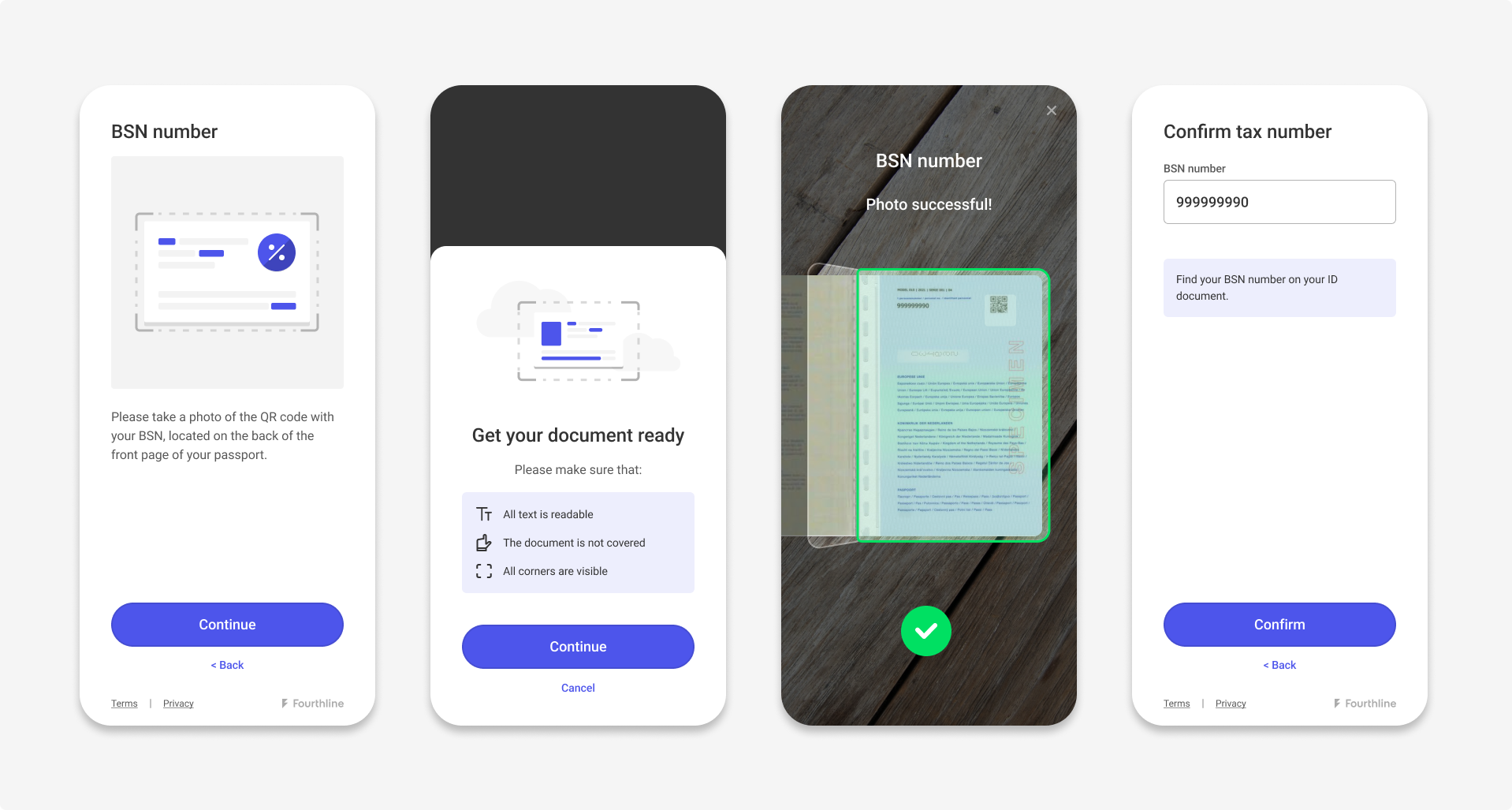
Primary Document with TIN (Dutch flow)
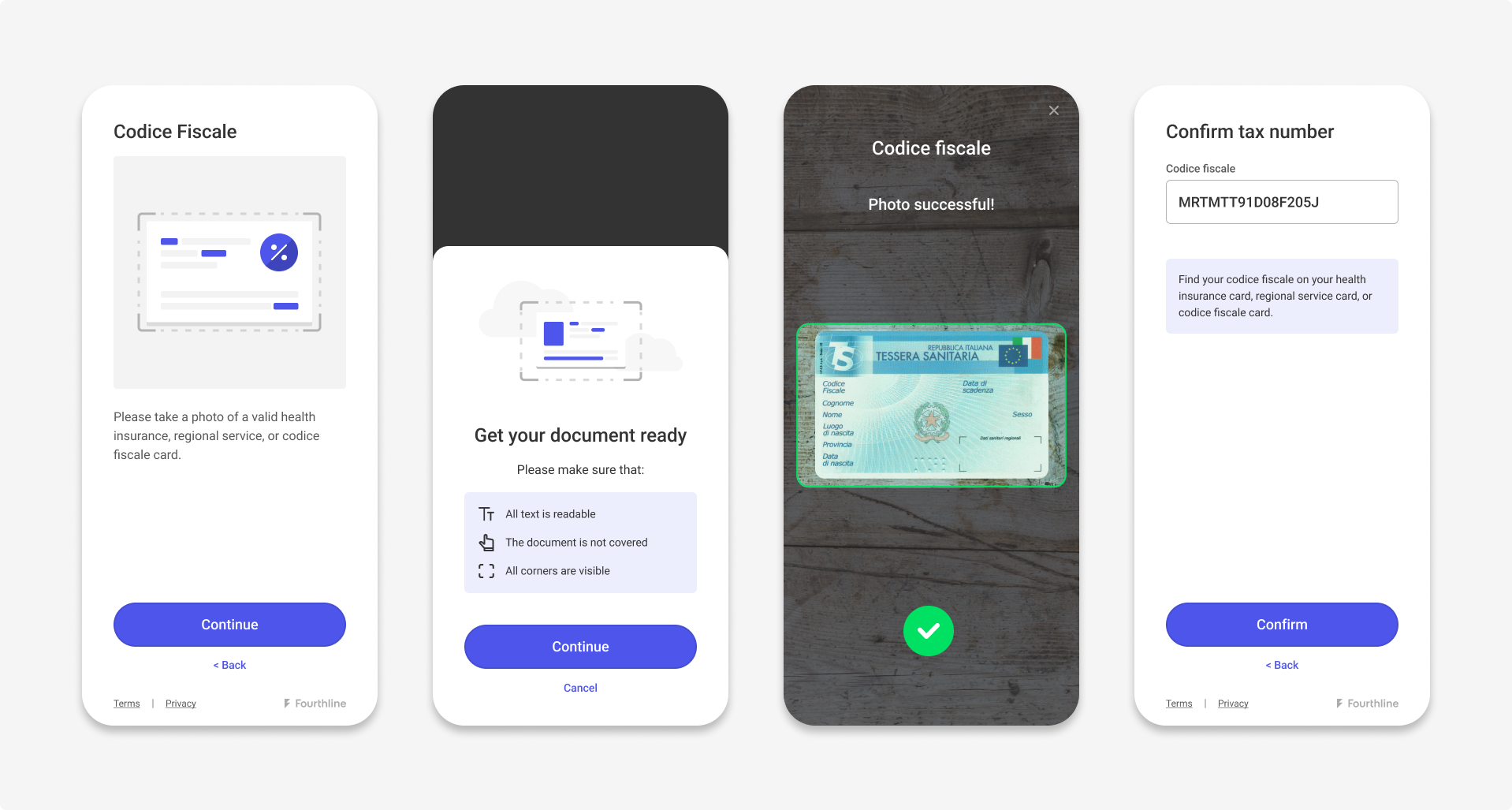
Secondary Document with TIN (Italian flow)
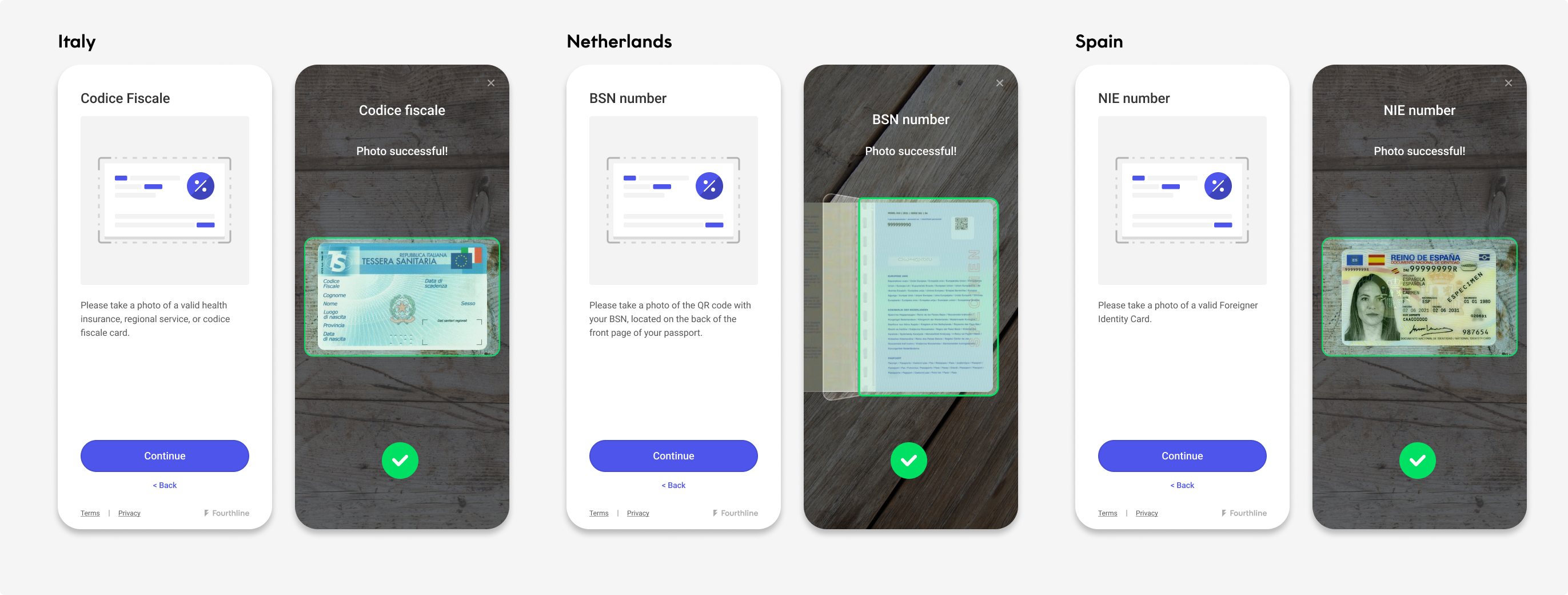
Country-specific UI
Leverage Fourthline's expert knowledge of country-specific requirements regarding document types and TINs. You can integrate the Tax Number module in two ways:
-
App Drop-in and Web SDK: This data is captured and uploaded by the SDK.
Our SDK UIs offer customized workflows for various markets, including but not limited to: Netherlands (BSN), Italy (Italian codice fiscale), Spain (Spanish número de identificación fiscal (NIF), Documento Nacional de Identidad (DNI), or número de identidad de extranjero (NIE)).
The client enters the TIN module, takes photos of the required document side(s), and the TIN is then either extracted automatically, confirmed, or entered manually (depending on workflow, document type, and other conditions).
See the following scenarios for the Italian market:
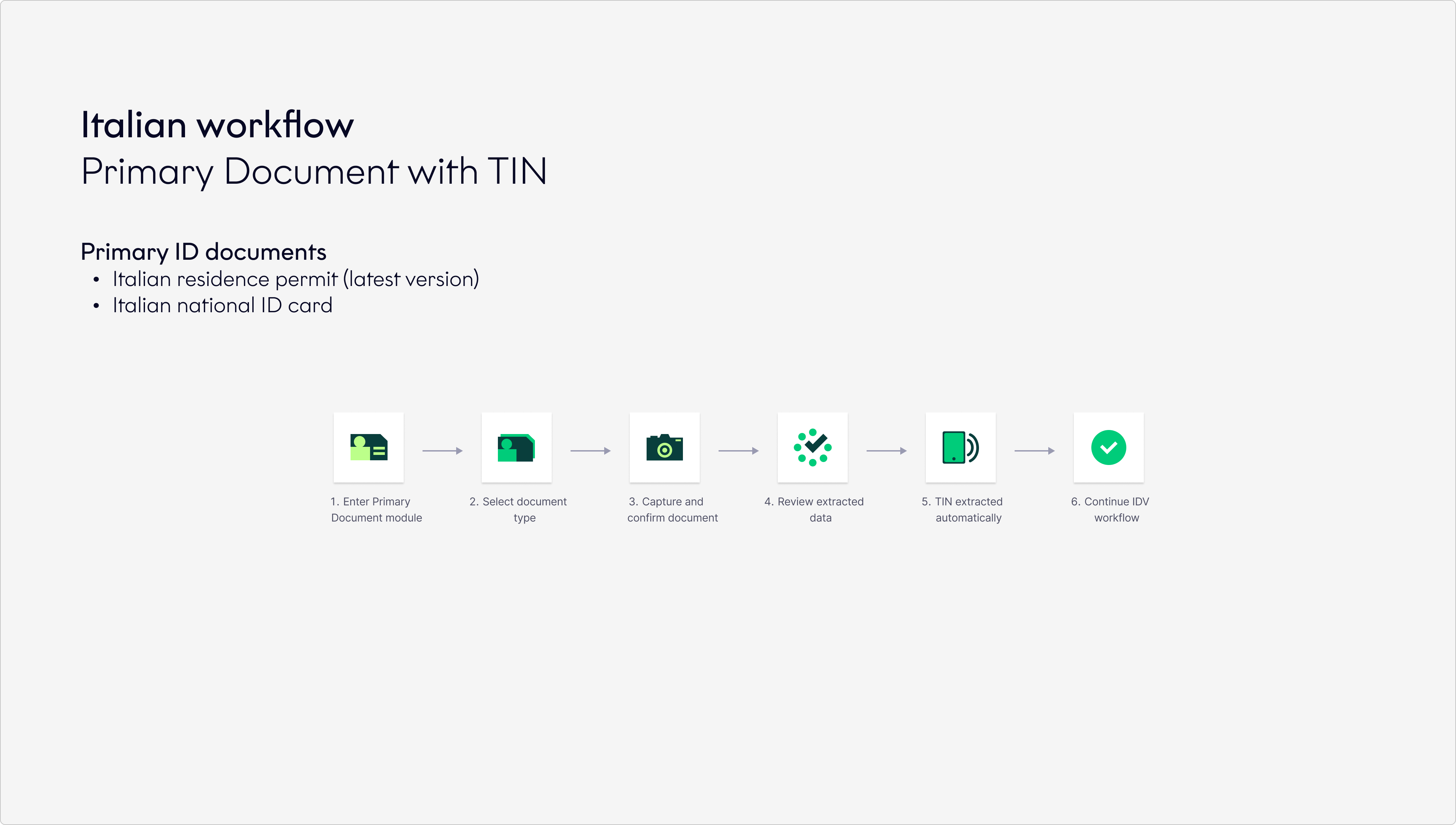
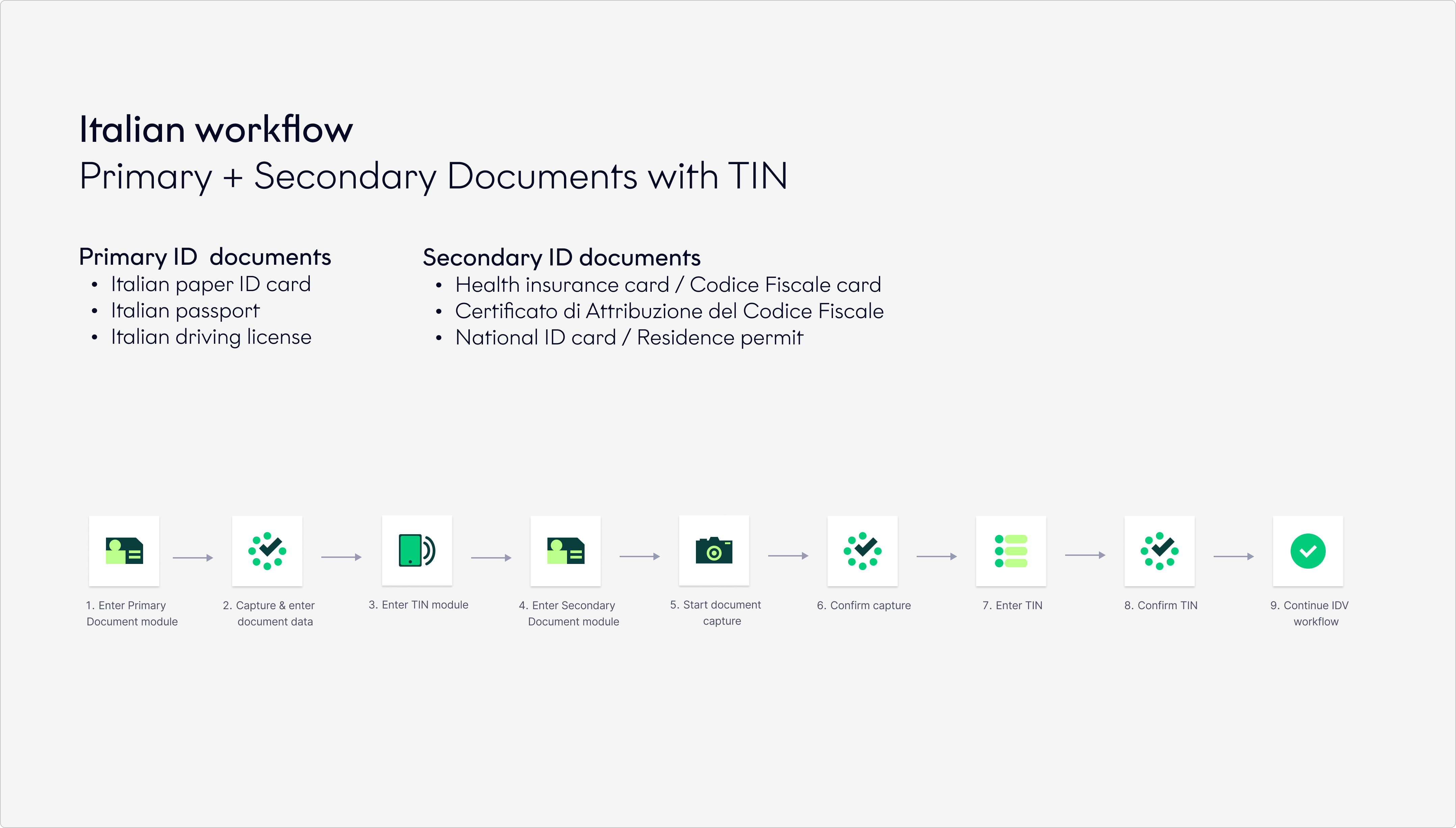
- API-only and App Components: For more information, contact your Fourthline delivery manager.
Signature extraction
Fourthline can detect and extract a handwritten signature from supported identity documents.
When a signature is successfully extracted, Fourthline returns the extracted signature as a cropped JPEG image.
To find out which identity documents support signature extraction, contact your Fourthline customer success manager.
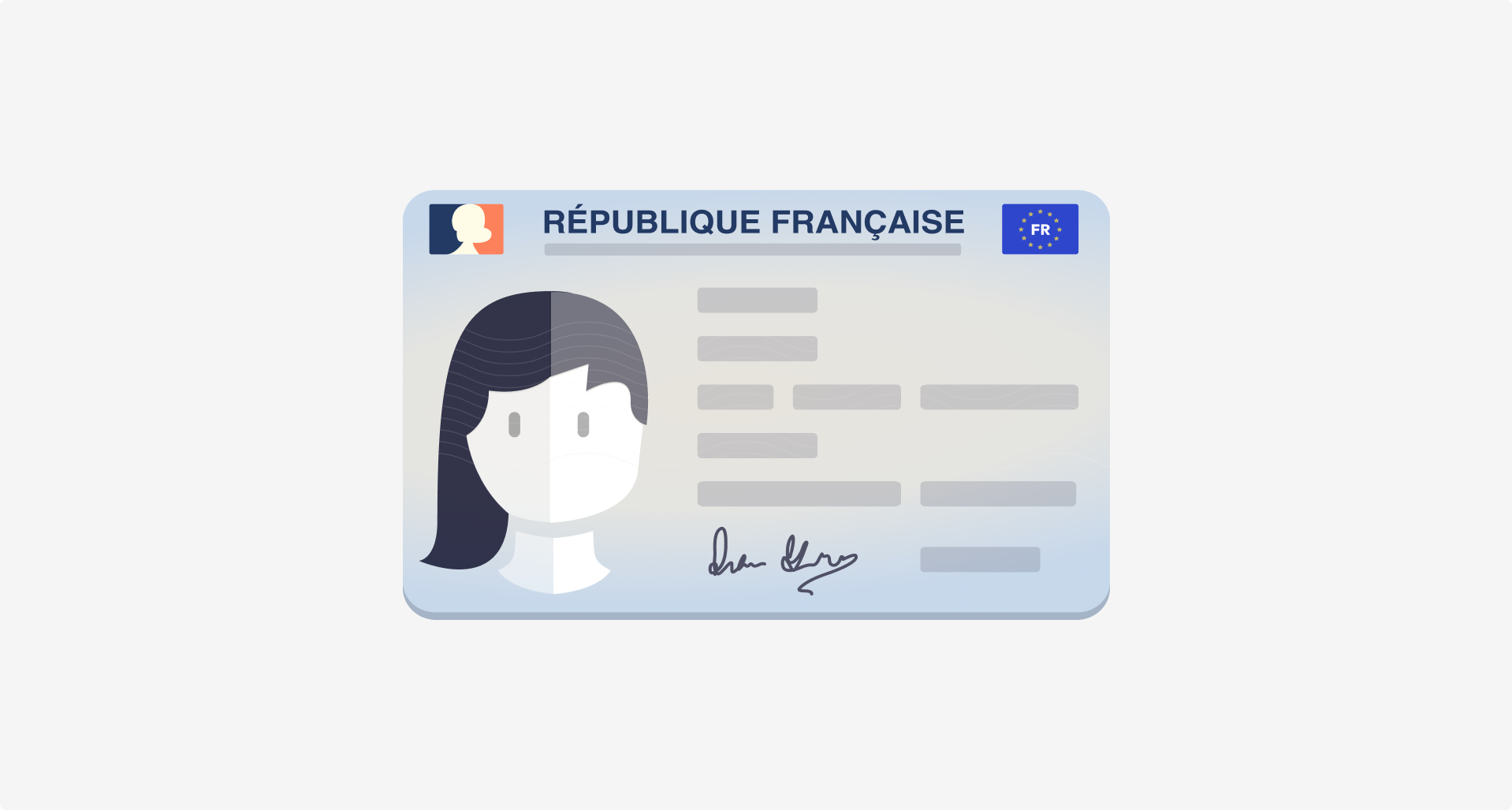
Identity document with signature
How it works
During document verification, Fourthline detects the signature on the identity document and extracts the signature area as an image.
The extracted signature is available in the following outputs:
- In the CDD Report (PDF), similar to security features.
- In the CDD Report ZIP file, as a JPEG image alongside other identity-related media.
- In the JSON report, as a Base64-encoded JPEG image.
If Fourthline cannot extract a signature or the identity document does not support signature extraction, no signature image is available.
Example JPEG image

Next steps
Learn how to combine these products in your Identity Verification solution.
Updated about 2 hours ago