
UK Solution Integration
Integration Guides
API-only guide
This guide provides step-by-step instructions on how to integrate the UK Identity Verification solution via our API.
Before you begin, make sure you have completed the UK solution setup.
Flow
Click to magnify.
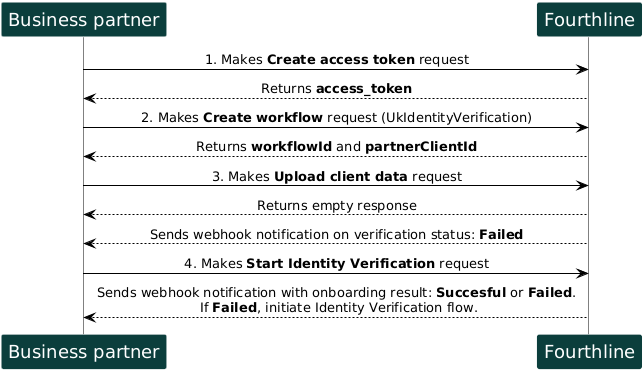
1. Authenticate
Create an access token to authenticate in our API:
- You provide your Fourthline API credentials.
- You receive an
access_token.
Tutorial: Create access tokenAPI Reference: Create access token
Important
For security, access tokens are valid for 1 hour only.
If your token expires, create a new access token by making another Create access token request.
2. Create workflow
Create a workflow, providing your unique identifier for the client:
- You specify the
workflowNameand your unique identifier for the client. - You receive a
workflowIdand a FourthlineclientId.
Tutorial: Create UK workflowAPI Reference: Create workflow
3. Upload client data
Upload the client's personal data:
- You provide the
workflowIdand the client's personal data and address. - A successful response is empty.
Tutorial: Upload client data (UK)API Reference: Upload client data
4. Start Identity Verification
Request Fourthline to start the identity verification process:
- You provide the
workflowId. - A successful response is empty.
API Reference – Start Identity Verification
| Status | Description | Action |
|---|---|---|
Successful | The onboarding process finished successfully. | No further action needed. |
Failed | Invalid or missing data was found. | Create a new Identity Verification flow. |
Updated 3 months ago